 Firefox
 1 / 10
About Bussi Font
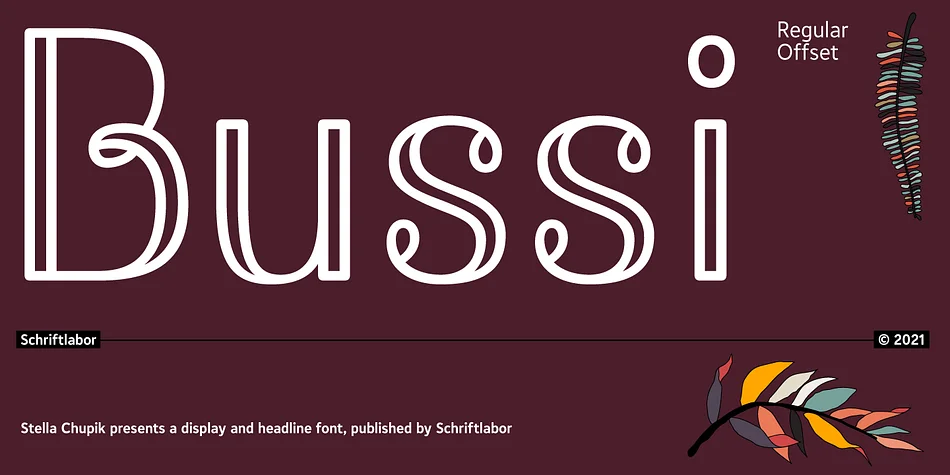
Bussi captures that energetic, organic quality of handwritten letters, the kind you'd find in someone's sketchbook, filled with personality and motion. Designed by Schriftlabor, this display font draws from the visual language of hand lettering and bullet journaling, where the focus is on making words feel alive on the page rather than just readable. The letterforms have a flowing, slightly swirly character that works because it doesn't overreach for sophistication.
What began as a capitals-only headline typeface has expanded considerably since its creation. The collection now contains nearly 1400 glyphs and five stylistic sets, giving you room to mix and match letterforms and find just the right flourish for each project. This depth means you can layer different character versions for visual interest, or dial back the ornamentation when you need something cleaner and more direct.
For anyone creating scrapbooking layouts, personalizing journal covers, or designing sticker sheets and gift labels, Bussi brings an approachable handmade sensibility that feels genuine rather than forced. Planner enthusiasts and designers working on greeting cards will find the variable letterforms particularly useful for building visual interest without overdoing it. Bussi is available on Creative Fabrica, ready for you to explore all its stylistic possibilities.
Style & Use Cases
- Overall Style
- Eye-catching, Bold
- Use Case
- Headlines, Logos
- Ideal For
- posters, branding, and social media graphics
- Pairs With
- a readable sans or serif for body
How to Install Bussi Font
Step-by-step instructions for every platform
- 1Download the Bussi font file (.ttf or .otf).
- 2Locate the downloaded file in your Downloads folder.
- 3Right-click the font file.
- 4Select "Install" to install for the current user, or "Install for all users" to make it available system-wide.
- 5Bussi is now available in Word, Photoshop, Illustrator, and all other apps.
More by Schriftlabor
View all →
Browse fonts by theme
Curated collections →Saw a font in a picture? Identify any font from an image with our free Font Finder.
More Display Fonts
Browse all →







What pairs well with Bussi Font?
Bussi Font is a display font that shines as a display or heading face. Pair it with a clean sans-serif or serif font for body text — the contrast creates a clear hierarchy while the two styles stay balanced and easy to read.




Bussi Font
by Schriftlabor
Reviewed by the FontBoxDL team · Updated September 2026