 Firefox
 1 / 6
1 / 6About Brush Hand Marker Font
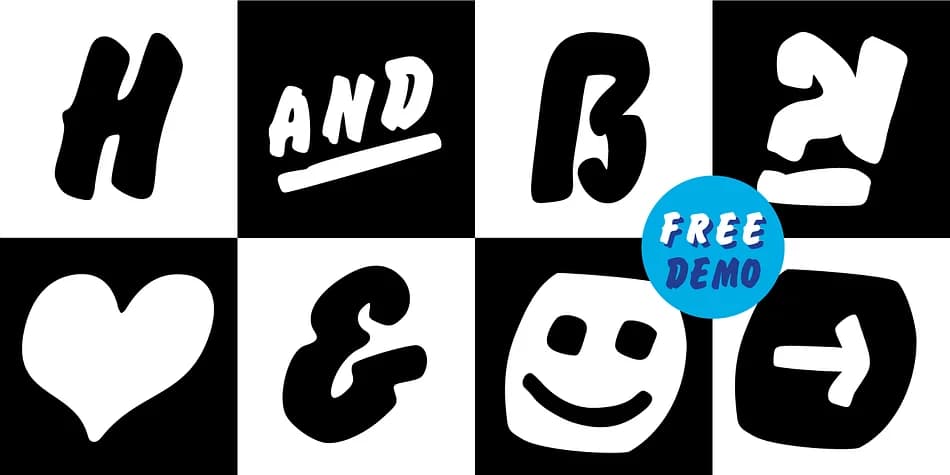
Brush Hand Marker has a loose, energetic feel that brings handwritten character to any design without looking scripted. Created by Manuel Viergutz at Typo Graphic Design in 2020, this rough display font comes in four distinctive styles: Italic, Invert, Shadow, and 3D variants.
The comprehensive 348-glyph character set includes over 100 decorative additions that extend well beyond standard letters. You get dingbats, arrows, emoji-style symbols, and geometric shapes mixed in with stylistic alternates and ornamental ligatures. Type #LOVE to trigger a heart symbol, or #SMILE for a cheerful smiley face. The dual stylistic sets give you flexibility to swap letterforms throughout your work, which proves especially useful when designing event invitations, merch packaging, or handmade product labels for small craft sellers.
Headlines and display sizes are where this typeface truly shines. Pair it with a clean geometric sans-serif for body copy to maintain readability while letting the marker style dominate your titles. The font is available in both OTF for print projects and WOFF for web use, covering whatever medium your design lands on. Browse Creative Fabrica to grab it and start mixing in some hand-drawn energy.
Style & Use Cases
- Overall Style
- Eye-catching, Bold
- Use Case
- Headlines, Logos
- Ideal For
- posters, branding, and social media graphics
- Pairs With
- a readable sans or serif for body
How to Install Brush Hand Marker Font
Step-by-step instructions for every platform
- 1Download the Brush Hand Marker font file (.ttf or .otf).
- 2Locate the downloaded file in your Downloads folder.
- 3Right-click the font file.
- 4Select "Install" to install for the current user, or "Install for all users" to make it available system-wide.
- 5Brush Hand Marker is now available in Word, Photoshop, Illustrator, and all other apps.
More by Typo Graphic Design
View all →

Browse fonts by theme
Curated collections →Saw a font in a picture? Identify any font from an image with our free Font Finder.
More Display Fonts
Browse all →







What pairs well with Brush Hand Marker Font?
Brush Hand Marker Font is a display font that shines as a display or heading face. Pair it with a clean sans-serif or serif font for body text — the contrast creates a clear hierarchy while the two styles stay balanced and easy to read.



Brush Hand Marker Font
Reviewed by the FontBoxDL team · Updated June 2026