 Firefox
 1 / 8
1 / 8About Wood Sans Font
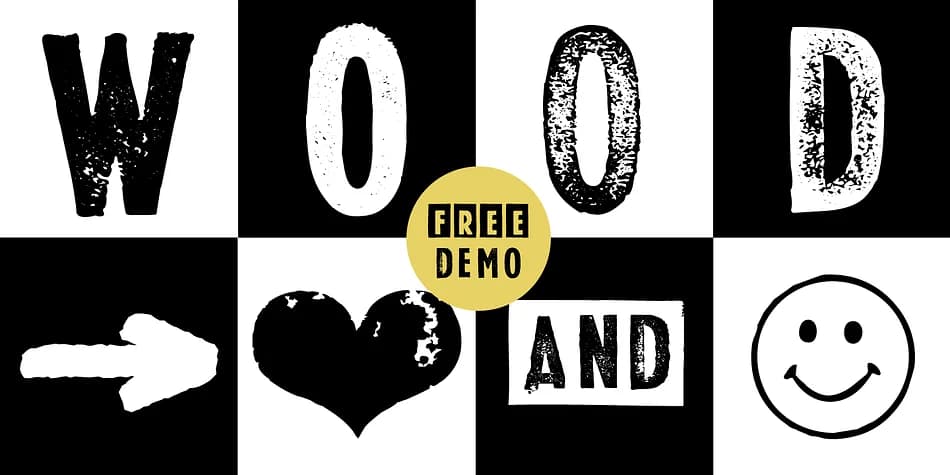
Picture yourself designing a vintage band poster or retro bakery menu. Wood Sans, created by Manuel Viergutz at Typo Graphic Design in 2021, captures that raw, tactile energy of hand-carved wood type. Viergutz discovered original wood letters at a German flea market, then translated their rough character into this versatile display typeface that brings authentic texture to any project.
The font ships in eight distinct styles (Clean, Clean Invert, Clean Mix, Rough, Rough Misprint, Rough Alt, Rough Dark, and Icons), giving you countless ways to layer and combine letterforms. With 450 glyphs spanning Adobe Latin 2 support for 69 languages, you get far more than simple letters. Hidden inside are decorative extras: ornamental icons, arrows, dingbats, geometric shapes, and special ligatures that transform shortcuts like #LOVE into ❤ or #SMILE into ☺. Three stylistic alternates let you swap out letters for fresh variation, making Wood Sans ideal for vintage concert tickets, craft beer labels, hand-lettered wedding invitation suites, and DIY record cover designs.
The magic happens at large headline sizes where texture and detail shine without overwhelming the eye. Grab the free demo version to explore the full character set, then license the complete family on Creative Fabrica once you're convinced it's the right fit for your project.
Style & Use Cases
- Overall Style
- Iconographic
- Use Case
- Icons, Accents
- Ideal For
- ornaments, bullets, and decorative flourishes
- Pairs With
- any text font
How to Install Wood Sans Font
Step-by-step instructions for every platform
- 1Download the Wood Sans font file (.ttf or .otf).
- 2Locate the downloaded file in your Downloads folder.
- 3Right-click the font file.
- 4Select "Install" to install for the current user, or "Install for all users" to make it available system-wide.
- 5Wood Sans is now available in Word, Photoshop, Illustrator, and all other apps.
More by Typo Graphic Design
View all →
Browse fonts by theme
Curated collections →Saw a font in a picture? Identify any font from an image with our free Font Finder.
More Dingbats Fonts
Browse all →







What pairs well with Wood Sans Font?
Wood Sans Font is a versatile dingbats font that works for both headings and body text. Pair it with a contrasting sans-serif or serif font to add visual interest and a clear distinction between titles and body copy.



Wood Sans Font
Reviewed by the FontBoxDL team · Updated August 2026