 Firefox
 1 / 3
1 / 3About Breezy Font
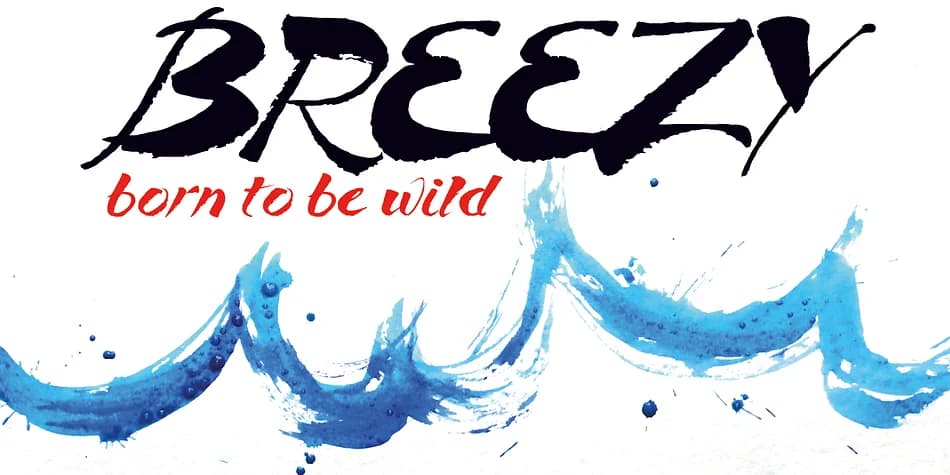
Breezy by Wiescher-Design is a brush script display font that embraces rawness and deliberate imperfection. The expressive strokes and unexpected letter connections give it a hand-drawn authenticity that feels honest and human, unlike the polished, machine-perfect typefaces that dominate contemporary design work. Every letter carries genuine weight and personality, refusing to fade into the background or apologize for its rough edges.
This is the font for designers who want imperfection to feel intentional rather than accidental. Reach for it when designing brewery labels and coffee roaster branding where handmade craftsmanship matters to your audience. It works equally well on punk concert posters, music event flyers, and vinyl record packaging where attitude is as important as legibility. Artisanal product labels, whether for small-batch cosmetics, craft tea, or handmade skincare lines, gain real credibility from Breezy's rough-edged aesthetic. Street art-inspired graphics and underground creative projects also find a natural home here. The crude quality keeps everything from slipping into corporate polish, which is exactly the point.
If you're tired of typefaces engineered to please everyone, Breezy deserves a spot in your collection. Get it on Creative Fabrica and start putting it to work on designs that celebrate honest imperfection.
Style & Use Cases
- Overall Style
- Eye-catching, Bold
- Use Case
- Headlines, Logos
- Ideal For
- posters, branding, and social media graphics
- Pairs With
- a readable sans or serif for body
How to Install Breezy Font
Step-by-step instructions for every platform
- 1Download the Breezy font file (.ttf or .otf).
- 2Locate the downloaded file in your Downloads folder.
- 3Right-click the font file.
- 4Select "Install" to install for the current user, or "Install for all users" to make it available system-wide.
- 5Breezy is now available in Word, Photoshop, Illustrator, and all other apps.
More by Wiescher-Design
View all →

Browse fonts by theme
Curated collections →Saw a font in a picture? Identify any font from an image with our free Font Finder.
More Display Fonts
Browse all →







What pairs well with Breezy Font?
Breezy Font is a display font that shines as a display or heading face. Pair it with a clean sans-serif or serif font for body text — the contrast creates a clear hierarchy while the two styles stay balanced and easy to read.



Breezy Font
Reviewed by the FontBoxDL team · Updated June 2026