 Firefox
 1 / 10
About Artis Font
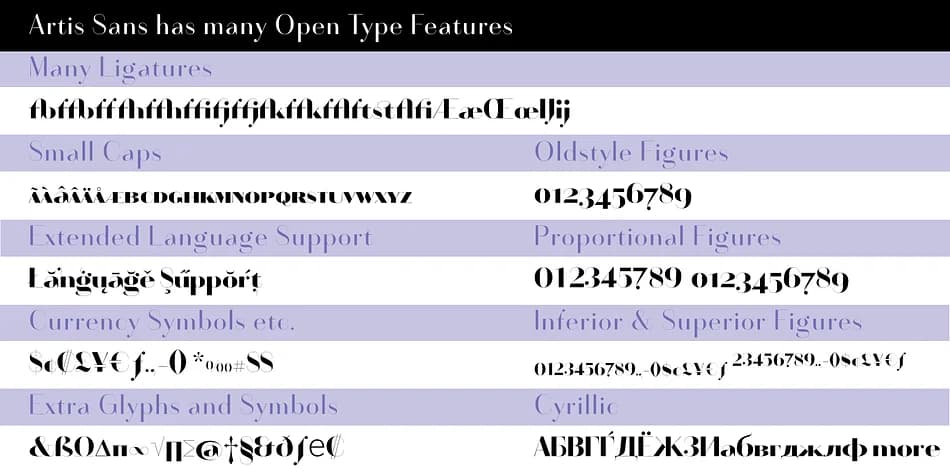
Artis by Wiescher-Design is a high-contrast decorative typeface rooted in art deco sensibilities with Renaissance flourishes. The dramatic play between thick and thin strokes creates visual impact while the extensive character set keeps it functional for real work. The best part: it comes with a companion face called Artis-Swing, which transforms the entire design system by letting you mix and match styles within a single family.
This dual-face approach opens doors for luxury product packaging, event invitation suites, restaurant menu headers, and upscale wine label design. You gain far more flexibility than you would with a standard single font, allowing for visual contrast that feels intentional rather than haphazard. Seven weights span from ExtraLight to Bold, so you control emphasis and hierarchy without needing alternate typefaces.
Artis is genuinely built for Europe: 964 glyphs cover Central European languages, Latin regions, and Cyrillic for Russia, Serbia, Macedonia, and Ukraine. The font includes oldstyle and lining figures, tabular variants, and an extensive ligature set, so whether you're setting luxury packaging text or crafting distinctive headlines, the details are already there. Head to Creative Fabrica to get Artis and start combining these elegant twins.
Style & Use Cases
- Overall Style
- Bold, Distinctive
- Use Case
- Headlines, Posters
- Ideal For
- logos, packaging, and standout titles
- Pairs With
- a neutral sans-serif
How to Install Artis Font
Step-by-step instructions for every platform
- 1Download the Artis font file (.ttf or .otf).
- 2Locate the downloaded file in your Downloads folder.
- 3Right-click the font file.
- 4Select "Install" to install for the current user, or "Install for all users" to make it available system-wide.
- 5Artis is now available in Word, Photoshop, Illustrator, and all other apps.
More by Wiescher-Design
View all →
Browse fonts by theme
Curated collections →Saw a font in a picture? Identify any font from an image with our free Font Finder.
More Decorative Fonts
Browse all →







What pairs well with Artis Font?
Artis Font is a decorative font that shines as a display or heading face. Pair it with a clean sans-serif or serif font for body text — the contrast creates a clear hierarchy while the two styles stay balanced and easy to read.



Artis Font
Reviewed by the FontBoxDL team · Updated June 2026