 Firefox
About Alpha Delta Font
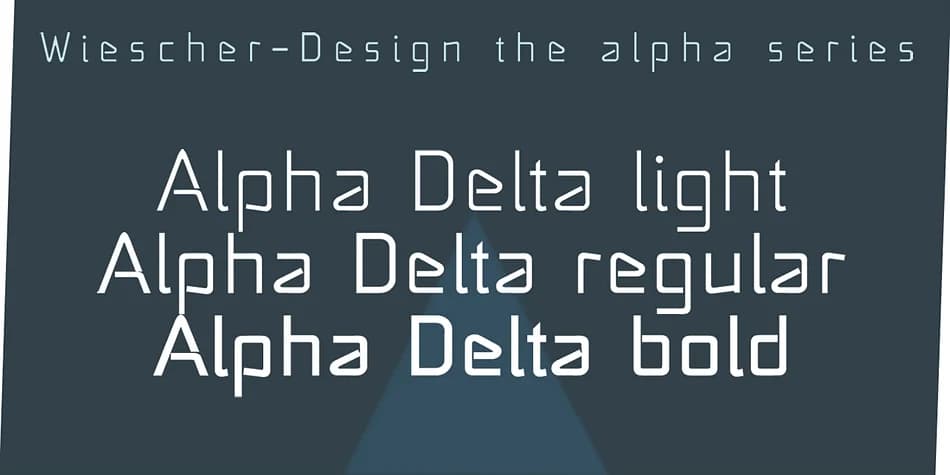
You're designing a concert poster and need type with angular, snappy tension. Alpha Delta, created by Gert Wiescher, draws its concept from the paperclip but pushes far beyond that humble starting point. The designer built letters from bent-metal geometry, creating forms that feel both structured and full of character. This is display type that anchors a headline without needing ornament or illustration underneath. It works because it has personality without being precious.
The font shines in music event posters, indie podcast cover art, tech company branding, and experimental graphic design. Angular letterforms work particularly well on zine covers, album artwork, and gaming interface designs where precision matters alongside creative flair. Minimal storefronts and startup websites benefit equally from its confident, clean attitude. It functions just as well in print or digital, lending edge when minimalism alone isn't quite enough.
The typeface reveals its full potential at larger sizes, where geometric construction becomes a real asset. Standard character coverage and language support make it practical for serious design work. Find it on Creative Fabrica and add it to your toolkit for projects that need to stand apart.
Style & Use Cases
- Overall Style
- Eye-catching, Bold
- Use Case
- Headlines, Logos
- Ideal For
- posters, branding, and social media graphics
- Pairs With
- a readable sans or serif for body
How to Install Alpha Delta Font
Step-by-step instructions for every platform
- 1Download the Alpha Delta font file (.ttf or .otf).
- 2Locate the downloaded file in your Downloads folder.
- 3Right-click the font file.
- 4Select "Install" to install for the current user, or "Install for all users" to make it available system-wide.
- 5Alpha Delta is now available in Word, Photoshop, Illustrator, and all other apps.
More by Wiescher-Design
View all →

Browse fonts by theme
Curated collections →Saw a font in a picture? Identify any font from an image with our free Font Finder.
More Display Fonts
Browse all →







What pairs well with Alpha Delta Font?
Alpha Delta Font is a display font that shines as a display or heading face. Pair it with a clean sans-serif or serif font for body text — the contrast creates a clear hierarchy while the two styles stay balanced and easy to read.



Alpha Delta Font
Reviewed by the FontBoxDL team · Updated September 2026