 Firefox
 1 / 7
1 / 7Loading font…
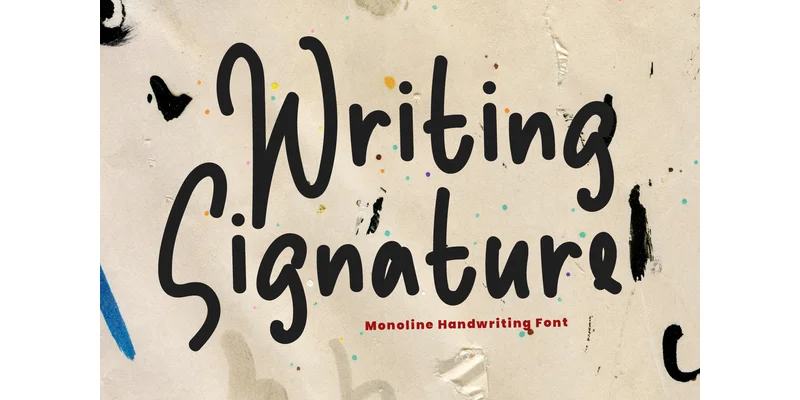
About Writing Signature Font by 21Design Font
Picture designing a wedding invitation suite with proper monograms and envelope addressing, or creating a boutique logo that needs that handcrafted elegance without actually hiring a lettering artist. Writing Signature Font by 21Design is a script typeface built for those exact moments when premium branding matters most. It captures the fluidity of a formal signature with carefully drawn letterforms and decorative flourishes that feel personal and intentional rather than mass-produced or generic.
This font shines in upscale branding projects, custom event stationery, and boutique product packaging where clients expect refinement and attention to detail. Swashes and tails give immediate character to personalized monograms and gift label designs. Its display weight renders beautifully at large sizes, making it equally at home in social media headers for lifestyle brands or hand-lettered style graphics for creative studios and design agencies. Decorative alternates within the letterforms let you customize the appearance without losing legibility across different applications and sizes.
You get a surprisingly versatile tool that reads as refined and intentional even at smaller sizes, so it works from business cards to wedding announcements, poster designs, and certificate work. Grab Writing Signature Font from Creative Fabrica and bring this polished script to your next project.
Style & Use Cases
- Overall Style
- Eye-catching, Bold, 21design
- Use Case
- Headlines, Logos
- Ideal For
- posters, branding, and social media graphics
- Pairs With
- a readable sans or serif for body
OpenType Features
Writing Signature Font by 21Design ships with 1 OpenType feature you can switch on in apps that support them (Illustrator, InDesign, Affinity, Figma, CSS font-feature-settings).
- Standard ligatures
How to Install Writing Signature Font by 21Design Font
Step-by-step instructions for every platform
- 1Download the Writing Signature Font by 21Design font file (.ttf or .otf).
- 2Locate the downloaded file in your Downloads folder.
- 3Right-click the font file.
- 4Select "Install" to install for the current user, or "Install for all users" to make it available system-wide.
- 5Writing Signature Font by 21Design is now available in Word, Photoshop, Illustrator, and all other apps.
More by 21Design
View all →

Browse fonts by theme
Curated collections →Saw a font in a picture? Identify any font from an image with our free Font Finder.
More Display Fonts
Browse all →







What pairs well with Writing Signature Font by 21Design Font?
Writing Signature Font by 21Design Font is a display font that shines as a display or heading face. Pair it with a clean sans-serif or serif font for body text — the contrast creates a clear hierarchy while the two styles stay balanced and easy to read.




Writing Signature Font by 21Design Font
by 21Design
Reviewed by the FontBoxDL team · Updated October 2026
One-time purchase