 Firefox
 1 / 5
1 / 5About Wireline JNL Font
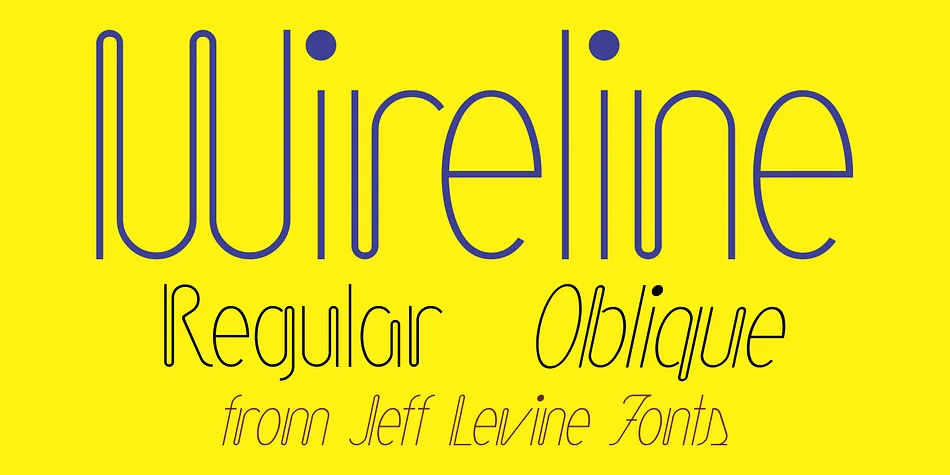
Wireline JNL by Jeff Levine Fonts is a thin monoline display typeface drawn from the visual language of vintage neon signage. Its inspiration comes from a mid-century photograph of a glowing storefront sign at Cushman's Furs, where the designer captured that characteristic bent-wire aesthetic and translated it into a refined, optical treatment that reads clean and modern despite its retro DNA.
This typeface brings real presence across multiple design applications thanks to its thin stroke weight and geometric character construction. Vintage steakhouse menus and cocktail bar branding benefit tremendously from its nostalgic-yet-refined character, while boutique cosmetics packaging and art deco restaurant concepts find natural momentum in its retro styling. Speakeasy-inspired identities and upscale vintage apparel logos also thrive when paired with this font, channeling that mid-century hotel sign quality with intention. You get both regular and oblique versions, letting you add typographic movement to headlines, posters, and signage mockups as the project demands.
What keeps Wireline JNL from feeling kitschy is its restraint. The wireframe construction stays honest to its neon inspiration without leaning on gimmicks, making it a genuine option for designers seeking authentic retro character. Pick it up on Creative Fabrica and bring timeless glowing-sign energy to your work.
Style & Use Cases
- Overall Style
- Eye-catching, Bold
- Use Case
- Headlines, Logos
- Ideal For
- posters, branding, and social media graphics
- Pairs With
- a readable sans or serif for body
How to Install Wireline JNL Font
Step-by-step instructions for every platform
- 1Download the Wireline JNL font file (.ttf or .otf).
- 2Locate the downloaded file in your Downloads folder.
- 3Right-click the font file.
- 4Select "Install" to install for the current user, or "Install for all users" to make it available system-wide.
- 5Wireline JNL is now available in Word, Photoshop, Illustrator, and all other apps.
More by Jeff Levine Fonts
View all →



Browse fonts by theme
Curated collections →Saw a font in a picture? Identify any font from an image with our free Font Finder.
More Display Fonts
Browse all →







What pairs well with Wireline JNL Font?
Wireline JNL Font is a display font that shines as a display or heading face. Pair it with a clean sans-serif or serif font for body text — the contrast creates a clear hierarchy while the two styles stay balanced and easy to read.




Wireline JNL Font
Reviewed by the FontBoxDL team · Updated September 2026