 Firefox
 1 / 5
1 / 5About VINTAGE POSTER JNL Font
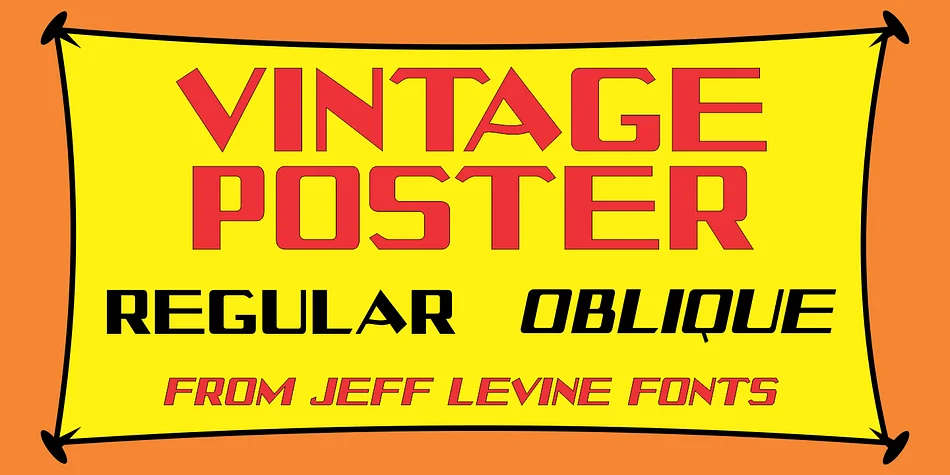
Bold and unapologetic, this typeface evokes the energy of early twentieth-century street signage. Vintage Poster JNL, designed by Jeff Levine Fonts, channels the hand-painted work of old-school show card artists and sign painters, drawing inspiration from Harry B. Wright's 1950 "Lettering" compendium.
The slab-like letterforms work beautifully for concert poster designs, vintage beer label treatments, retro diner menu covers, and antique market signage that needs instant period credibility. Both regular and oblique versions give you the flexibility to add emphasis or create visual hierarchy without swapping fonts. The chunky, distinctive character of each letter feels genuinely rooted in its early-century origins, without the overwrought nostalgia that plagues other retro typefaces. There's a straightforwardness here that speaks to practical craftsmanship rather than artificial aging.
The thick strokes and generous counters make it legible even when sized for bold headlines or eye-catching posters, yet it retains enough personality to work well in smaller display settings too. Pair this with a clean, contemporary sans-serif for body text to maintain contrast and ensure readability in longer passages. Let Vintage Poster JNL command attention in your headlines, titles, and design focal points. It's available on Creative Fabrica, ready to bring authentic vintage character to your next retro or period-specific project.
Style & Use Cases
- Overall Style
- Eye-catching, Bold
- Use Case
- Headlines, Logos
- Ideal For
- posters, branding, and social media graphics
- Pairs With
- a readable sans or serif for body
How to Install VINTAGE POSTER JNL Font
Step-by-step instructions for every platform
- 1Download the VINTAGE POSTER JNL font file (.ttf or .otf).
- 2Locate the downloaded file in your Downloads folder.
- 3Right-click the font file.
- 4Select "Install" to install for the current user, or "Install for all users" to make it available system-wide.
- 5VINTAGE POSTER JNL is now available in Word, Photoshop, Illustrator, and all other apps.
More by Jeff Levine Fonts
View all →



Browse fonts by theme
Curated collections →Saw a font in a picture? Identify any font from an image with our free Font Finder.
More Display Fonts
Browse all →







What pairs well with VINTAGE POSTER JNL Font?
VINTAGE POSTER JNL Font is a display font that shines as a display or heading face. Pair it with a clean sans-serif or serif font for body text — the contrast creates a clear hierarchy while the two styles stay balanced and easy to read.




VINTAGE POSTER JNL Font
Reviewed by the FontBoxDL team · Updated September 2026