 Firefox
 1 / 10
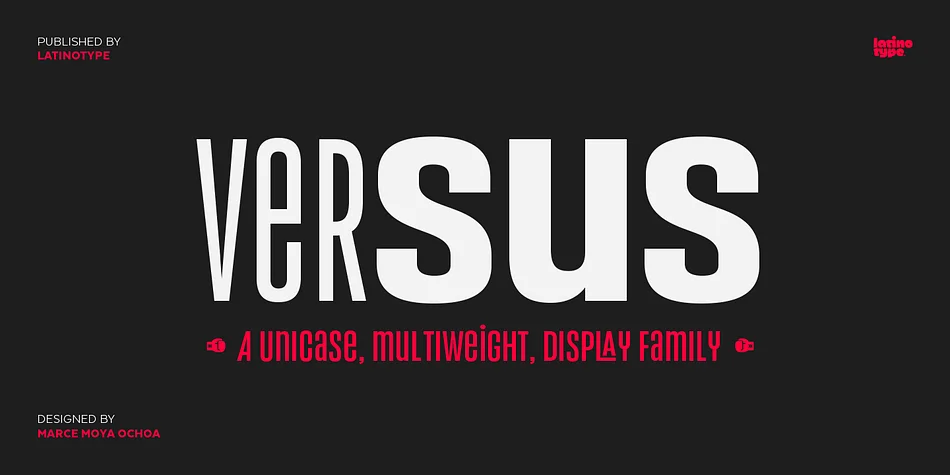
About Versus Font
Picture a graphic designer laying out a wrestling merchandise brand or concert poster that absolutely needs to command attention. That's where Versus, designed by Latinotype, steps in with its bold, distinctive character. Inspired by the vibrant aesthetic of Latin American boxing rings, this display sans serif channels that raw energy and swagger into a typeface system built for impact.
The font's nine weights span from Extra Light to Ultra, offering genuine flexibility for band merchandise, energy drink labels, sports event signage, and nightclub posters. Its short ascenders and descenders work especially well in the tightly packed layouts you'd use for movie titles or packaging headlines. Over 200 languages are supported across the character set, so your designs can reach international audiences without needing a backup font.
What makes Versus feel less like another generic display font is its rich collection of stylistic alternates and a complete ligature set. Mix and match the weights within a single design to layer depth and visual interest, then layer in alternates to create something genuinely personal and memorable. The orthogonal terminals give it a mechanical precision that reads sharp at large sizes. Grab it on Creative Fabrica and add some unapologetic personality to your next project.
Style & Use Cases
- Overall Style
- Eye-catching, Bold
- Use Case
- Headlines, Logos
- Ideal For
- posters, branding, and social media graphics
- Pairs With
- a readable sans or serif for body
How to Install Versus Font
Step-by-step instructions for every platform
- 1Download the Versus font file (.ttf or .otf).
- 2Locate the downloaded file in your Downloads folder.
- 3Right-click the font file.
- 4Select "Install" to install for the current user, or "Install for all users" to make it available system-wide.
- 5Versus is now available in Word, Photoshop, Illustrator, and all other apps.
More by Latinotype
View all →

Browse fonts by theme
Curated collections →Saw a font in a picture? Identify any font from an image with our free Font Finder.
More Display Fonts
Browse all →







What pairs well with Versus Font?
Versus Font is a display font that shines as a display or heading face. Pair it with a clean sans-serif or serif font for body text — the contrast creates a clear hierarchy while the two styles stay balanced and easy to read.




Versus Font
by Latinotype
Reviewed by the FontBoxDL team · Updated October 2026