 Firefox
 1 / 5
1 / 5About URW Microgramma Font
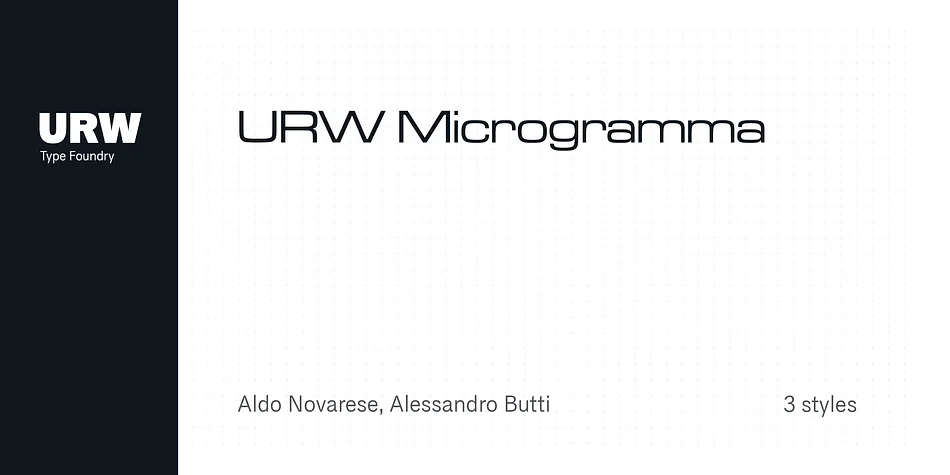
URW Microgramma's geometric letterforms carry a distinctive post-war optimism, all sharp angles and industrial precision. Designed by the URW Type Foundry in the 1950s, this display typeface captures that cultural moment when modernism met tomorrow, with clean, angular shapes that feel equally at home in a Cold War-era boardroom or a contemporary retro-futuristic design project. The typeface ships in multiple weights, giving you real flexibility in how loud or refined you want the message to land.
This font works exceptionally well for designers tackling retro sci-fi movie posters, vintage vinyl record covers, steampunk branding identities, and authentic 1950s-inspired packaging for specialty coffee roasters, boutique software startups, and mid-century-themed consumer brands. Its all-caps construction is particularly striking on event invitations with a retro twist, vintage-style signage that plays up the atomic-age aesthetic, or anywhere you need a typeface with genuine character. The strong personality commands attention without strain, letting the letterforms do the work for you.
URW Microgramma suits designers and art directors seeking display work with historical grounding and raw visual impact. This typeface bridges past and present, connecting audiences to a specific era while remaining graphic and contemporary. You'll find it on Creative Fabrica, ready to download alongside thousands of other display and specialty typefaces.
Style & Use Cases
- Overall Style
- Eye-catching, Bold
- Use Case
- Headlines, Logos
- Ideal For
- posters, branding, and social media graphics
- Pairs With
- a readable sans or serif for body
How to Install URW Microgramma Font
Step-by-step instructions for every platform
- 1Download the URW Microgramma font file (.ttf or .otf).
- 2Locate the downloaded file in your Downloads folder.
- 3Right-click the font file.
- 4Select "Install" to install for the current user, or "Install for all users" to make it available system-wide.
- 5URW Microgramma is now available in Word, Photoshop, Illustrator, and all other apps.
More by URW Type Foundry
View all →
Browse fonts by theme
Curated collections →Saw a font in a picture? Identify any font from an image with our free Font Finder.
More Display Fonts
Browse all →







What pairs well with URW Microgramma Font?
URW Microgramma Font is a display font that shines as a display or heading face. Pair it with a clean sans-serif or serif font for body text — the contrast creates a clear hierarchy while the two styles stay balanced and easy to read.




URW Microgramma Font
Reviewed by the FontBoxDL team · Updated September 2026