 Firefox
 1 / 6
1 / 6About Ungap Blocks Variable Font
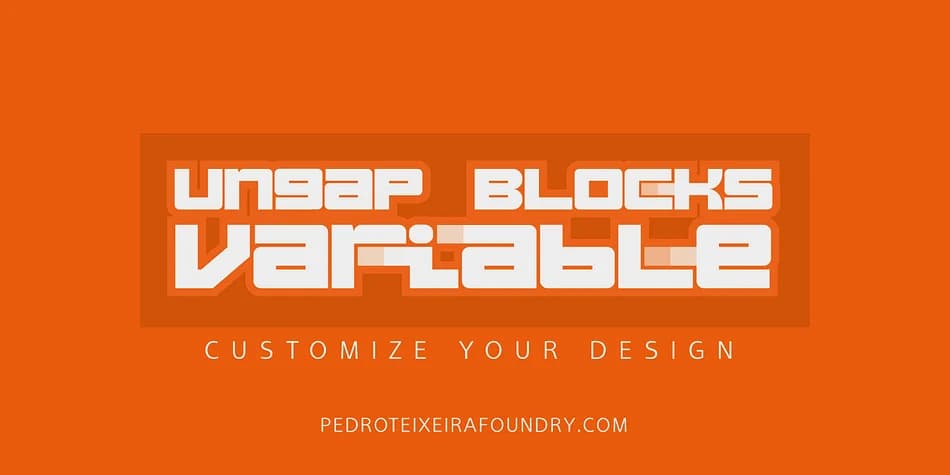
Imagine you're designing a retro arcade game interface or tackling a bold brutalist poster where every letter needs to command attention through pure geometric form. Ungap Blocks Variable, designed by Pedro Teixeira, brings exactly that structural confidence. The entire typeface is built from modular squares that stack together with clean mechanical precision.
What sets this typeface apart is the variable font control it provides. You can extend the terminals and crossbars of individual glyphs using the variable slider (available in recent versions of Illustrator and Photoshop), giving you direct command over how blocky or extended each letter becomes. That flexibility works brilliantly for retro arcade game titles, bold geometric branding systems, modular logo lockups, and minimalist poster designs where letters function almost like building blocks you're actively composing and refining in real time.
The squared letterforms carry visual weight at any size, and because you can adjust those terminals independently, you gain unusual design freedom without swapping typefaces. Each character becomes a malleable element rather than a locked shape. It's a variable display typeface that genuinely rewards hands-on experimentation and creative iteration. Grab Ungap Blocks Variable on Creative Fabrica and start exploring everything you can construct with its modular potential.
Style & Use Cases
- Overall Style
- Eye-catching, Bold
- Use Case
- Headlines, Logos
- Ideal For
- posters, branding, and social media graphics
- Pairs With
- a readable sans or serif for body
How to Install Ungap Blocks Variable Font
Step-by-step instructions for every platform
- 1Download the Ungap Blocks Variable font file (.ttf or .otf).
- 2Locate the downloaded file in your Downloads folder.
- 3Right-click the font file.
- 4Select "Install" to install for the current user, or "Install for all users" to make it available system-wide.
- 5Ungap Blocks Variable is now available in Word, Photoshop, Illustrator, and all other apps.
More by Pedro Teixeira
View all →

Browse fonts by theme
Curated collections →Saw a font in a picture? Identify any font from an image with our free Font Finder.
More Display Fonts
Browse all →







What pairs well with Ungap Blocks Variable Font?
Ungap Blocks Variable Font is a display font that shines as a display or heading face. Pair it with a clean sans-serif or serif font for body text — the contrast creates a clear hierarchy while the two styles stay balanced and easy to read.



Ungap Blocks Variable Font
Reviewed by the FontBoxDL team · Updated September 2026