 Firefox
 1 / 8
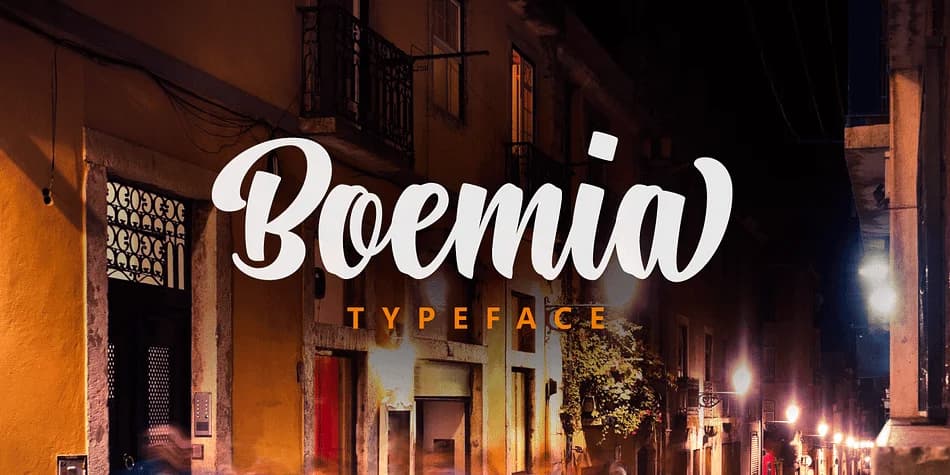
1 / 8About Boemia Font
Boemia, designed by Pedro Teixeira, draws its character from handwritten letterforms that feel naturally expressive. Each stroke carries the weight of a pen held at just the right angle, creating dynamic curves and organic connections between letters. The design balances the warmth of authentic handwriting with enough consistency to remain legible at any size in both digital and print applications.
What sets Boemia apart is the extensive collection of alternate lowercase letters and decorative swashes built directly into the typeface. These variations let designers swap characters mid-word to create layered, custom effects that make each project feel uniquely tailored. For custom wedding invitation suites, hand-lettered product labels for natural skincare lines, artistic thank-you card designs, or indie packaging for small-batch confectionery, the alternates work particularly well. They add sophistication without overstepping, and you gain direct control over the rhythm and flow of your text by layering swashes for emphasis or choosing alternates to match the mood of specific design moments.
Designers and small-business owners who value genuine handwritten character will find a refined professional tool here. Boemia is available on Creative Fabrica for straightforward access to its full alternate and swash library.
Style & Use Cases
- Overall Style
- Elegant, Flowing
- Use Case
- Invitations, Branding
- Ideal For
- wedding stationery, greeting cards, and signatures
- Pairs With
- a simple uppercase sans
How to Install Boemia Font
Step-by-step instructions for every platform
- 1Download the Boemia font file (.ttf or .otf).
- 2Locate the downloaded file in your Downloads folder.
- 3Right-click the font file.
- 4Select "Install" to install for the current user, or "Install for all users" to make it available system-wide.
- 5Boemia is now available in Word, Photoshop, Illustrator, and all other apps.
More by Pedro Teixeira
View all →

Browse fonts by theme
Curated collections →Saw a font in a picture? Identify any font from an image with our free Font Finder.
More Script Handwritten Fonts
Browse all →







What pairs well with Boemia Font?
Boemia Font is a script font that shines as a display or heading face. Pair it with a clean sans-serif or serif font for body text — the contrast creates a clear hierarchy while the two styles stay balanced and easy to read.



Boemia Font
Reviewed by the FontBoxDL team · Updated July 2026