 Firefox
 1 / 10
About Tropical Carnival Font
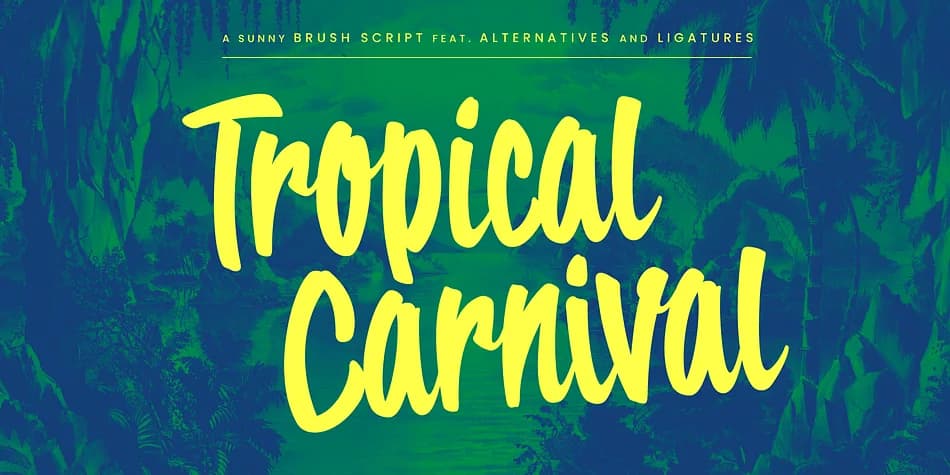
This brush script radiates the carefree energy of a sun-soaked coastal getaway. Tropical Carnival from Wingsart Studio brings an effortless, hand-drawn personality to any project that needs warmth and genuine optimism.
The font truly shines on retro tiki bar branding, tropical fruit and smoothie labels, vacation rental website headers, and music festival posters. Its natural flow feels authentic without sacrificing legibility, working equally well on vintage-style travel stickers, boutique resort event invitations, and eco-friendly cosmetics packaging. The playful yet readable balance makes it versatile enough for comic book covers and vintage menu designs. You get a complete character set with uppercase, lowercase, numerals, punctuation, and full language support, plus an entire collection of alternates for maximum design flexibility. OpenType ligatures are built into the font. Simply switch on Standard Ligatures in your design app, and it automatically selects the most natural letter connections as you type, delivering that authentic handcrafted quality without manual tweaking.
Pair Tropical Carnival with a clean, geometric sans-serif for body text and supporting elements to maintain strong readability while the script dominates and draws the eye. Grab it from Creative Fabrica and let this vibrant typeface bring genuine sunshine to your next creative project.
Style & Use Cases
- Overall Style
- Eye-catching, Bold
- Use Case
- Headlines, Logos
- Ideal For
- posters, branding, and social media graphics
- Pairs With
- a readable sans or serif for body
How to Install Tropical Carnival Font
Step-by-step instructions for every platform
- 1Download the Tropical Carnival font file (.ttf or .otf).
- 2Locate the downloaded file in your Downloads folder.
- 3Right-click the font file.
- 4Select "Install" to install for the current user, or "Install for all users" to make it available system-wide.
- 5Tropical Carnival is now available in Word, Photoshop, Illustrator, and all other apps.
More by Wingsart Studio
View all →



Browse fonts by theme
Curated collections →Saw a font in a picture? Identify any font from an image with our free Font Finder.
More Display Fonts
Browse all →







What pairs well with Tropical Carnival Font?
Tropical Carnival Font is a display font that shines as a display or heading face. Pair it with a clean sans-serif or serif font for body text — the contrast creates a clear hierarchy while the two styles stay balanced and easy to read.



Tropical Carnival Font
Reviewed by the FontBoxDL team · Updated July 2026