 Firefox
 1 / 5
1 / 5About THEATER NEWS JNL Font
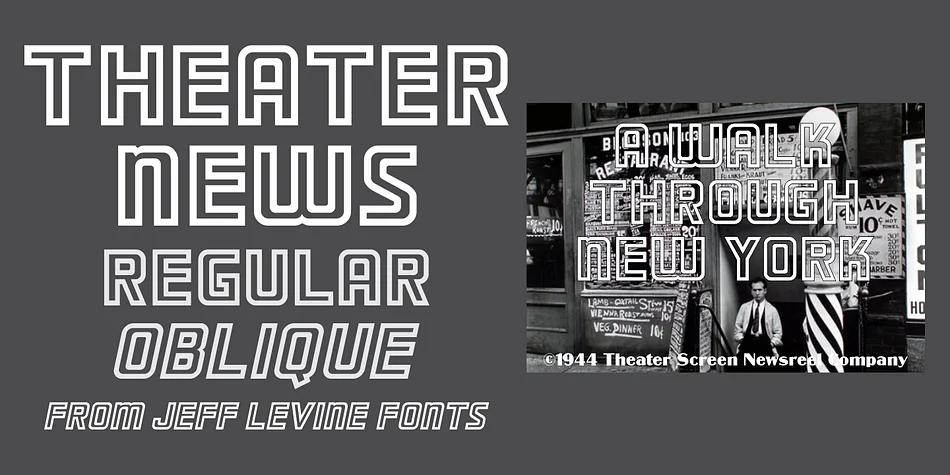
Bold, sturdy letterforms with rounded corners and a clean outline style define this typeface, which draws directly from 1960s British newsreel titling. Created by Jeff Levine Fonts, Theater News JNL captures that particular energy of 1960s graphic design, when heavy geometric forms and Art Deco influences shaped how information was presented on screen. The font is available in both upright and oblique versions, giving you the flexibility to shift emphasis and create dynamic visual depth across layouts.
This typeface works well for anyone pursuing vintage-inspired design projects. Retro concert posters, vinyl record sleeve designs, and mid-century themed packaging all benefit from the architectural weight and graphic character baked into every letter. It's equally suited to theatrical program covers, restaurant menu headers, band merchandise that leans into period aesthetics, or indie comic book lettering where bold, rounded geometry feels more welcoming than stark. The rounded-corner construction keeps the type friendly rather than heavy-handed, which matters when you're balancing retro appeal with actual legibility.
If your project needs that historical texture without tipping into precious nostalgia, Theater News JNL delivers. That 1960s energy works because it isn't decorative fluff; it's about how audiences read and engage with bold, purposeful letterforms. Find it on Creative Fabrica and add this character-rich display font to your collection.
Style & Use Cases
- Overall Style
- Eye-catching, Bold
- Use Case
- Headlines, Logos
- Ideal For
- posters, branding, and social media graphics
- Pairs With
- a readable sans or serif for body
How to Install THEATER NEWS JNL Font
Step-by-step instructions for every platform
- 1Download the THEATER NEWS JNL font file (.ttf or .otf).
- 2Locate the downloaded file in your Downloads folder.
- 3Right-click the font file.
- 4Select "Install" to install for the current user, or "Install for all users" to make it available system-wide.
- 5THEATER NEWS JNL is now available in Word, Photoshop, Illustrator, and all other apps.
More by Jeff Levine Fonts
View all →



Browse fonts by theme
Curated collections →Saw a font in a picture? Identify any font from an image with our free Font Finder.
More Display Fonts
Browse all →







What pairs well with THEATER NEWS JNL Font?
THEATER NEWS JNL Font is a display font that shines as a display or heading face. Pair it with a clean sans-serif or serif font for body text — the contrast creates a clear hierarchy while the two styles stay balanced and easy to read.




THEATER NEWS JNL Font
Reviewed by the FontBoxDL team · Updated September 2026