 Firefox
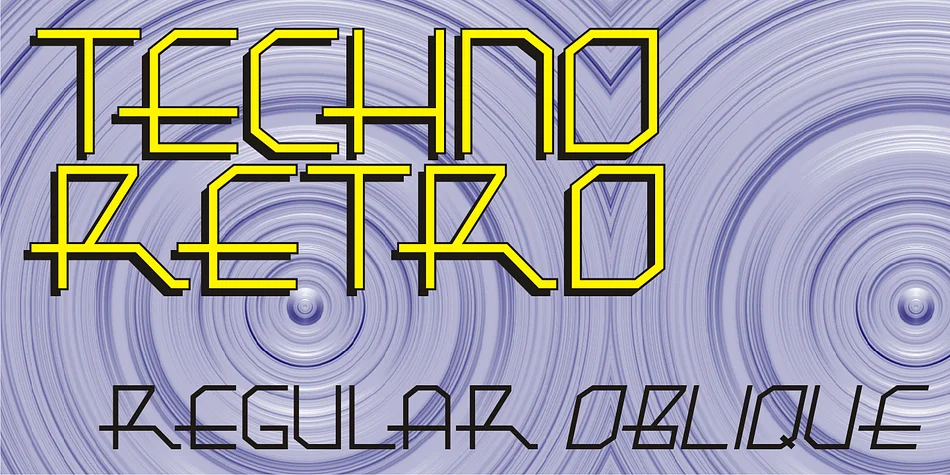
About TECHNO RETRO JNL Font
TECHNO RETRO JNL by Jeff Levine Fonts captures the electric optimism of mid-century hand lettering with a distinctly retro-futuristic edge. What makes this typeface compelling is that while it reads with the unmistakable visual language of 1980s design, it actually traces its roots back to 1940s sheet music covers. This grounding in genuine typographic history sets it apart from pure pastiche or trend-chasing revivals.
This display font excels when nostalgia serves a real design purpose rather than existing as hollow decoration. Use it for vintage concert posters that feel authentically rooted in an era, retro album cover treatments with genuine character, throwback party invitations that honor period aesthetics, and nostalgic product packaging that commits fully to mid-century charm. The bold, confident letterforms command attention at display sizes and deliver unmistakable personality without overwhelming accompanying text or imagery.
Designers working with 80s-inspired branding, indie music covers, or that kitschy-yet-intentional sensibility understand the value of typefaces that genuinely straddle multiple eras. There's real heft and character in every stroke. Grab TECHNO RETRO JNL on Creative Fabrica to bring that time-traveling authenticity to your next project.
Style & Use Cases
- Overall Style
- Eye-catching, Bold
- Use Case
- Headlines, Logos
- Ideal For
- posters, branding, and social media graphics
- Pairs With
- a readable sans or serif for body
How to Install TECHNO RETRO JNL Font
Step-by-step instructions for every platform
- 1Download the TECHNO RETRO JNL font file (.ttf or .otf).
- 2Locate the downloaded file in your Downloads folder.
- 3Right-click the font file.
- 4Select "Install" to install for the current user, or "Install for all users" to make it available system-wide.
- 5TECHNO RETRO JNL is now available in Word, Photoshop, Illustrator, and all other apps.
More by Jeff Levine Fonts
View all →



Browse fonts by theme
Curated collections →Saw a font in a picture? Identify any font from an image with our free Font Finder.
More Display Fonts
Browse all →







What pairs well with TECHNO RETRO JNL Font?
TECHNO RETRO JNL Font is a display font that shines as a display or heading face. Pair it with a clean sans-serif or serif font for body text — the contrast creates a clear hierarchy while the two styles stay balanced and easy to read.




TECHNO RETRO JNL Font
Reviewed by the FontBoxDL team · Updated September 2026