 Firefox
 1 / 10
About Sunray Aura Font
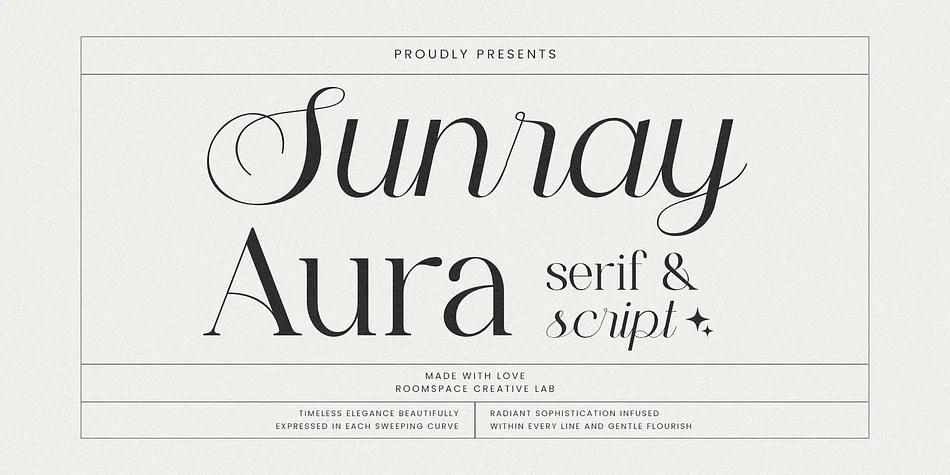
Sunray Aura by roomspace is a sophisticated display typeface that merges serif structure with script flourishes, creating typography that feels both established and genuinely romantic. The serif foundation provides solid weight and presence, while the flowing script components and gentle curves add visual movement without sacrificing control or readability at any size. This balance between formality and fluidity makes it particularly well-suited to display applications where both strength and elegance need to work together.
You'll find this typeface a natural fit for luxury branding systems, editorial mastheads, upscale wedding invitations, and premium packaging for boutique product lines. The strong kerning and refined proportions let it anchor large headlines just as comfortably as it supports smaller text blocks across varied layouts. Jewelry box labels for artisan makers, boutique hotel website headers, hand-lettered botanical print captions, personalized wedding invitation suites, and high-end cosmetics packaging all come alive with this typeface. Sunray Aura carries the kind of distinctive voice that signals quality and thoughtful craftsmanship without needing to announce itself loudly. Grab this typeface from Creative Fabrica to bring it into your next design project.
Style & Use Cases
- Overall Style
- Eye-catching, Bold
- Use Case
- Headlines, Logos
- Ideal For
- posters, branding, and social media graphics
- Pairs With
- a readable sans or serif for body
How to Install Sunray Aura Font
Step-by-step instructions for every platform
- 1Download the Sunray Aura font file (.ttf or .otf).
- 2Locate the downloaded file in your Downloads folder.
- 3Right-click the font file.
- 4Select "Install" to install for the current user, or "Install for all users" to make it available system-wide.
- 5Sunray Aura is now available in Word, Photoshop, Illustrator, and all other apps.
More by roomspace
View all →
Browse fonts by theme
Curated collections →Saw a font in a picture? Identify any font from an image with our free Font Finder.
More Display Fonts
Browse all →







What pairs well with Sunray Aura Font?
Sunray Aura Font is a display font that shines as a display or heading face. Pair it with a clean sans-serif or serif font for body text — the contrast creates a clear hierarchy while the two styles stay balanced and easy to read.




Sunray Aura Font
by roomspace
Reviewed by the FontBoxDL team · Updated September 2026