 Firefox
 1 / 6
1 / 6About Street Party JNL Font
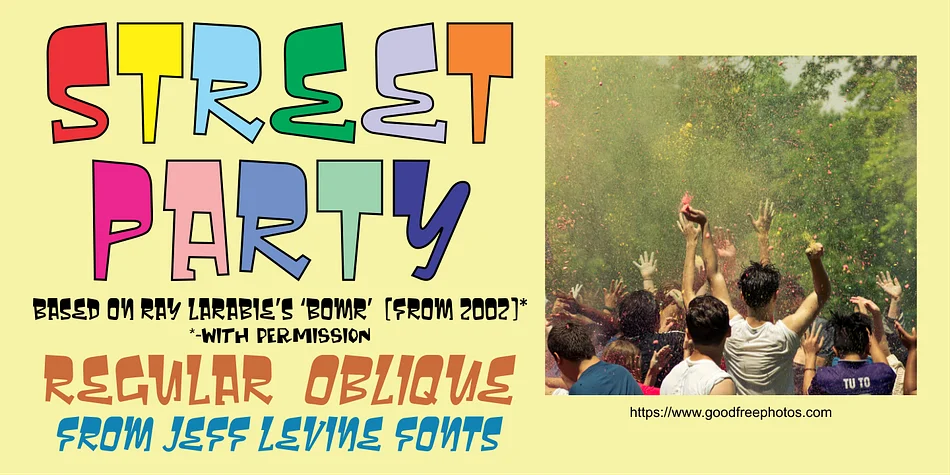
Street Party JNL has the infectious energy of street art and underground design culture coursing through every character. Jeff Levine Fonts created this playful display typeface as a refined reimagining of Bomr, Ray Larabie's 2002 design that sat dormant until its public domain release sparked new creative possibilities in 2022. When Levine refined the design, he softened it with rounded corners, unified the character heights, and redrew specific letters to enhance clarity and create a more cohesive, functional typeface.
This font shines across indie music album covers and playlist artwork, event posters for clubs and live music venues, skateboard and streetwear brand identity systems, and festival flyers or party invitation suites. The letterforms maintain their loose, street-inspired character while staying readable enough to work as commanding headlines. You're getting both regular and oblique versions, which means you have plenty of options for dynamic, angled layouts that feel intentional and exciting rather than chaotic or accidental.
Pair Street Party JNL with a clean, straightforward sans-serif like Montserrat for supporting text and body copy. This combination lets your display font remain the focal point of the design without everything feeling overcrowded or chaotic. Grab it on Creative Fabrica and start bringing some street energy to your next project.
Style & Use Cases
- Overall Style
- Eye-catching, Bold
- Use Case
- Headlines, Logos
- Ideal For
- posters, branding, and social media graphics
- Pairs With
- a readable sans or serif for body
How to Install Street Party JNL Font
Step-by-step instructions for every platform
- 1Download the Street Party JNL font file (.ttf or .otf).
- 2Locate the downloaded file in your Downloads folder.
- 3Right-click the font file.
- 4Select "Install" to install for the current user, or "Install for all users" to make it available system-wide.
- 5Street Party JNL is now available in Word, Photoshop, Illustrator, and all other apps.
More by Jeff Levine Fonts
View all →



Browse fonts by theme
Curated collections →Saw a font in a picture? Identify any font from an image with our free Font Finder.
More Display Fonts
Browse all →







What pairs well with Street Party JNL Font?
Street Party JNL Font is a display font that shines as a display or heading face. Pair it with a clean sans-serif or serif font for body text — the contrast creates a clear hierarchy while the two styles stay balanced and easy to read.




Street Party JNL Font
Reviewed by the FontBoxDL team · Updated September 2026