 Firefox
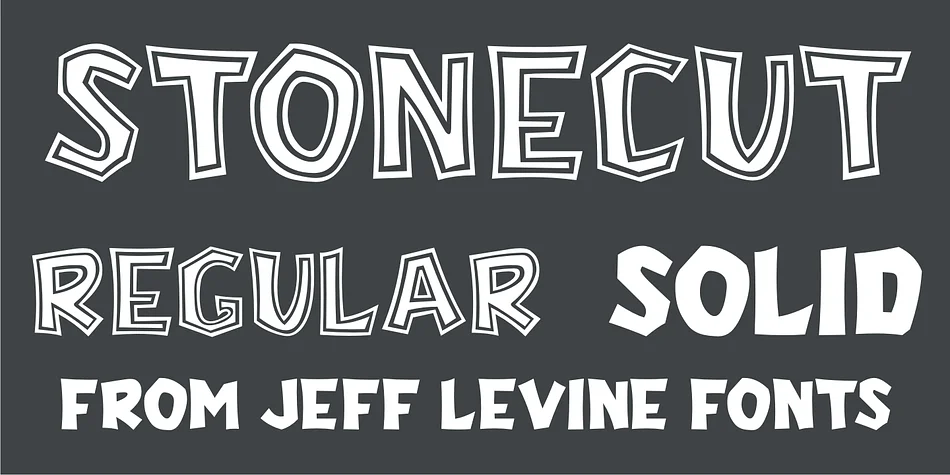
About STONECUT JNL Font
Picture carving letters directly into rough stone or weathered wood, creating permanent, deeply textured forms. STONECUT JNL by Jeff Levine Fonts captures that tactile, hand-hewn quality with blocky letterforms that genuinely read like letters sculpted from solid material. The design draws from vintage Dan X. Solo lettering references and comes in both solid and inline versions, giving you real flexibility depending on how much visual weight you want behind each letterform.
This display face excels for outdoor event signage, rustic cabin decor, adventure tour posters, and DIY carved wood signs. Stone Age themed projects, wilderness retreat branding, outdoor festival graphics, and rustic wedding materials all align perfectly well with this font's unpolished, authentic character. Solid letterforms sit much heavier and commanding, while the inline option adds dimensional interest without overwhelming busy layouts.
At large sizes, these chunky forms really hold up exceptionally well, making the font ideal for banners and outdoor installations where legibility matters across distance. Its rough-edged personality pairs beautifully with natural color palettes and earthy design schemes, giving your designs an authentic, grounded feel that reads as intentional rather than accidental. Grab STONECUT JNL on Creative Fabrica and add it to your growing collection of display fonts.
Style & Use Cases
- Overall Style
- Eye-catching, Bold
- Use Case
- Headlines, Logos
- Ideal For
- posters, branding, and social media graphics
- Pairs With
- a readable sans or serif for body
How to Install STONECUT JNL Font
Step-by-step instructions for every platform
- 1Download the STONECUT JNL font file (.ttf or .otf).
- 2Locate the downloaded file in your Downloads folder.
- 3Right-click the font file.
- 4Select "Install" to install for the current user, or "Install for all users" to make it available system-wide.
- 5STONECUT JNL is now available in Word, Photoshop, Illustrator, and all other apps.
More by Jeff Levine Fonts
View all →



Browse fonts by theme
Curated collections →Saw a font in a picture? Identify any font from an image with our free Font Finder.
More Display Fonts
Browse all →







What pairs well with STONECUT JNL Font?
STONECUT JNL Font is a display font that shines as a display or heading face. Pair it with a clean sans-serif or serif font for body text — the contrast creates a clear hierarchy while the two styles stay balanced and easy to read.




STONECUT JNL Font
Reviewed by the FontBoxDL team · Updated September 2026