 Firefox
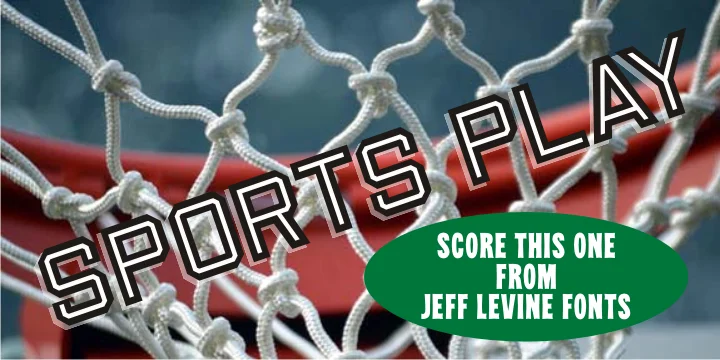
About SPORTS PLAY JNL Font
SPORTS PLAY JNL by Jeff Levine Fonts is a chamfered display typeface that captures the vibrant energy of early 1900s hand-lettered sports signage. The inline details give each letter genuine three-dimensional presence, mimicking the beveled edges you'd find on authentic vintage die-cut letterforms from that particular era. This distinctive style excels at retro athletic branding, vintage baseball merchandise labels, classic sports bar menu design, and nostalgic sporting event posters that genuinely demand period character and strong visual presence.
The typeface shines when you need designs that truly evoke that golden age of sports without landing as generic imitation. Whether creating work for print or physical signage, the chamfered treatment catches light and adds visual depth that flat letterforms simply cannot match. Collectors of vintage Americana naturally gravitate toward this font for their special projects, while anyone building a retro sports brand will find it instantly recognizable and remarkably effective. The geometric structure and commanding presence work just as well for brewery signage with sports ties, vintage clothing labels, athletic team merchandise, or nostalgic diner menus celebrating classic American culture and heritage.
Pick up SPORTS PLAY JNL on Creative Fabrica and add authentic vintage sports energy to your next design project.
Style & Use Cases
- Overall Style
- Eye-catching, Bold
- Use Case
- Headlines, Logos
- Ideal For
- posters, branding, and social media graphics
- Pairs With
- a readable sans or serif for body
How to Install SPORTS PLAY JNL Font
Step-by-step instructions for every platform
- 1Download the SPORTS PLAY JNL font file (.ttf or .otf).
- 2Locate the downloaded file in your Downloads folder.
- 3Right-click the font file.
- 4Select "Install" to install for the current user, or "Install for all users" to make it available system-wide.
- 5SPORTS PLAY JNL is now available in Word, Photoshop, Illustrator, and all other apps.
More by Jeff Levine Fonts
View all →



Browse fonts by theme
Curated collections →Saw a font in a picture? Identify any font from an image with our free Font Finder.
More Display Fonts
Browse all →







What pairs well with SPORTS PLAY JNL Font?
SPORTS PLAY JNL Font is a display font that shines as a display or heading face. Pair it with a clean sans-serif or serif font for body text — the contrast creates a clear hierarchy while the two styles stay balanced and easy to read.




SPORTS PLAY JNL Font
Reviewed by the FontBoxDL team · Updated September 2026