
 1 / 7
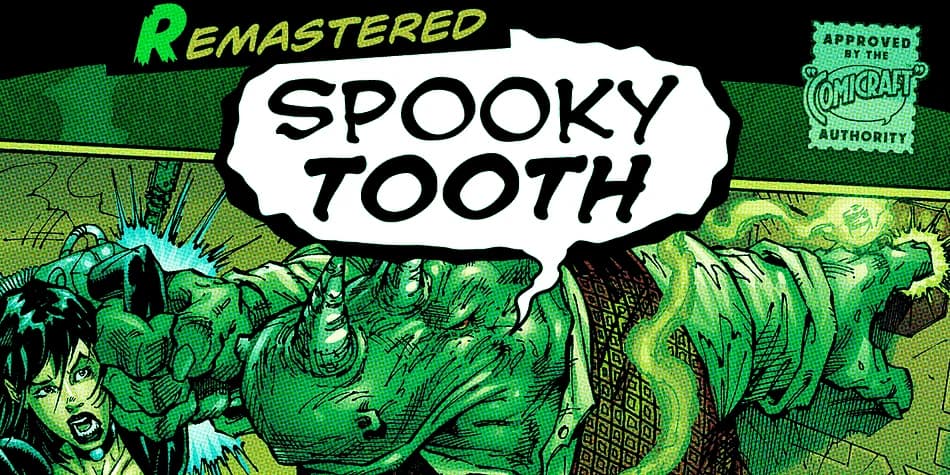
1 / 7About Spooky Tooth Font
You're designing a movie poster for a horror thriller, and you need type that looks as dangerous as the story itself. That's where Spooky Tooth from Comicraft comes in. This decorative typeface has a jagged, aggressive edge that immediately signals danger and unease, making every letter feel like a threat.
Its sharp letterforms work equally well for horror movie titles, haunted house event posters, or dark fantasy game graphics. Comic book covers featuring antiheroes and villains benefit from its menacing presence, while Halloween merchandise labels, spooky podcast artwork, and horror book covers gain instant character from the typeface's raw intensity. Each jagged peak and pointed serif gives every word a bite.
The typeface includes a Bold weight alongside automatic alternates, which means each letter can swap out for a variation, keeping your designs from feeling repetitive even when using the same characters multiple times. European, Vietnamese, and Cyrillic support expand its reach across global projects and international horror campaigns. At display sizes, Spooky Tooth's jagged serifs and aggressive curves read with punch and clarity, holding their impact whether printed large on a poster or featured on a smaller product label. Get Spooky Tooth on Creative Fabrica and start adding that signature menacing edge to your darkest designs.
Style & Use Cases
- Overall Style
- Bold, Distinctive
- Use Case
- Headlines, Posters
- Ideal For
- logos, packaging, and standout titles
- Pairs With
- a neutral sans-serif
How to Install Spooky Tooth Font
Step-by-step instructions for every platform
- 1Download the Spooky Tooth font file (.ttf or .otf).
- 2Locate the downloaded file in your Downloads folder.
- 3Right-click the font file.
- 4Select "Install" to install for the current user, or "Install for all users" to make it available system-wide.
- 5Spooky Tooth is now available in Word, Photoshop, Illustrator, and all other apps.
More by Comicraft
View all →
More Decorative Fonts
Browse all →







What pairs well with Spooky Tooth Font?
Spooky Tooth Font is a decorative font that shines as a display or heading face. Pair it with a clean sans-serif or serif font for body text — the contrast creates a clear hierarchy while the two styles stay balanced and easy to read.



Spooky Tooth Font
by Comicraft
Reviewed by the FontBoxDL team · Updated July 2026