 Firefox
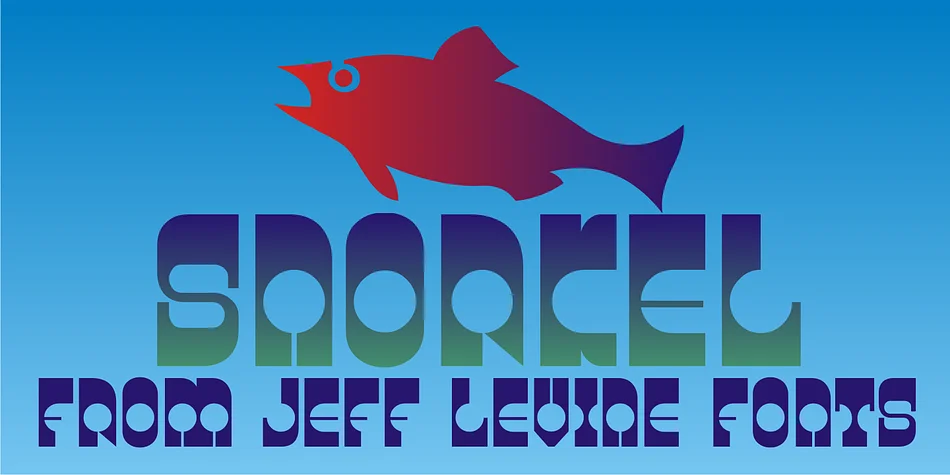
About SNORKEL JNL Font
SNORKEL JNL, designed by Jeff Levine Fonts, channels that uninhibited 1970s aesthetic where design rules went entirely overboard and absolutely nobody complained about it one bit. The letterforms burst with playful curves, unexpected angles, and genuine retro energy that feels equally at home on a vintage swim mask package or gracing the cover of a forgotten record album from your parents' basement. This is the kind of font that makes you smile before you even read the actual words on the page.
You'll find SNORKEL JNL works brilliantly for retro concert poster designs, especially when layered over moody photography or trippy background patterns. Disco-themed party invitations look genuinely groovy in this typeface, as do vintage record label mockups and thrift store signage that needs to feel like it survived at least four decades gathering dust in someone's attic. Even vintage travel branding takes on real personality here. The quirky character makes it ideal for anyone after that genuine 70s aesthetic without veering into obvious parody.
This font suits retro designers, nostalgic brands, and anyone wanting their project to scream pure 1970s fun with sincerity and style. Find SNORKEL JNL on Creative Fabrica and get that unmistakable groove into your next design.
Style & Use Cases
- Overall Style
- Eye-catching, Bold
- Use Case
- Headlines, Logos
- Ideal For
- posters, branding, and social media graphics
- Pairs With
- a readable sans or serif for body
How to Install SNORKEL JNL Font
Step-by-step instructions for every platform
- 1Download the SNORKEL JNL font file (.ttf or .otf).
- 2Locate the downloaded file in your Downloads folder.
- 3Right-click the font file.
- 4Select "Install" to install for the current user, or "Install for all users" to make it available system-wide.
- 5SNORKEL JNL is now available in Word, Photoshop, Illustrator, and all other apps.
More by Jeff Levine Fonts
View all →



Browse fonts by theme
Curated collections →Saw a font in a picture? Identify any font from an image with our free Font Finder.
More Display Fonts
Browse all →







What pairs well with SNORKEL JNL Font?
SNORKEL JNL Font is a display font that shines as a display or heading face. Pair it with a clean sans-serif or serif font for body text — the contrast creates a clear hierarchy while the two styles stay balanced and easy to read.




SNORKEL JNL Font
Reviewed by the FontBoxDL team · Updated September 2026