 Firefox
 1 / 10
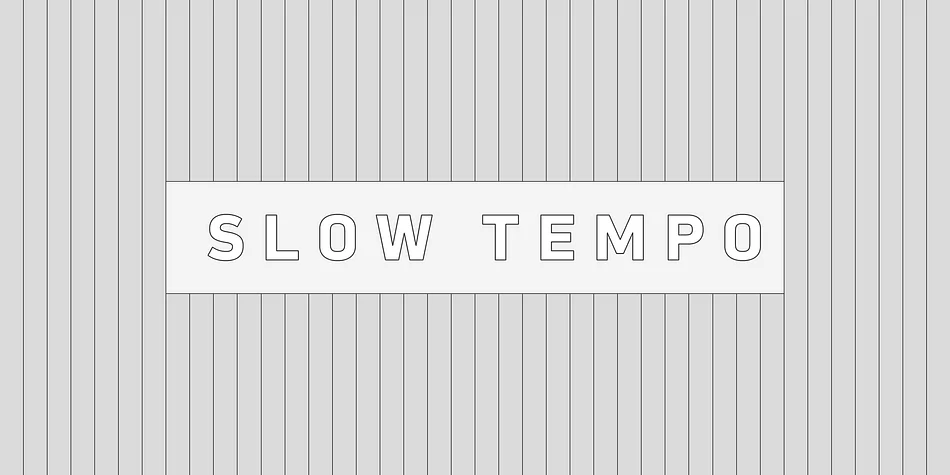
About Slow Tempo Font
Slow Tempo is a relaxed, loose-fit font that you can enjoy with ease.
It features basic, natural, and neutral letterforms with a clean skeletal structure, making it suitable for a wide range of applications. Still, Slow Tempo has several distinctive characteristics. Its gentle curvature at the intersections of stems with shoulders or bowls, along with large, open apertures, contributes to a calm and airy impression.
The letterforms have low contrast and geometric construction for a neutral feel, combined with a large x-height and humanistic terminals that enhance legibility and character recognition.
The family includes eight weights, each with matching italics, offering flexibility for everything from body text to impactful headings.
Slow Tempo also supports a wide range of international Latin-based languages and basic Cyrillic, including Basic Latin, Western European, Central, and South-Eastern European languages. It covers key encodings such as Mac Roman, Windows-1252, and Adobe Latin 1–3, expanding its usability across various global design projects.
Style & Use Cases
- Overall Style
- Eye-catching, Bold
- Use Case
- Headlines, Logos
- Ideal For
- posters, branding, and social media graphics
- Pairs With
- a readable sans or serif for body
How to Install Slow Tempo Font
Step-by-step instructions for every platform
- 1Download the Slow Tempo font file (.ttf or .otf).
- 2Locate the downloaded file in your Downloads folder.
- 3Right-click the font file.
- 4Select "Install" to install for the current user, or "Install for all users" to make it available system-wide.
- 5Slow Tempo is now available in Word, Photoshop, Illustrator, and all other apps.
More by Dharma Type
View all →
Browse fonts by theme
Curated collections →Saw a font in a picture? Identify any font from an image with our free Font Finder.
More Display Fonts
Browse all →







What pairs well with Slow Tempo Font?
Slow Tempo Font is a display font that shines as a display or heading face. Pair it with a clean sans-serif or serif font for body text — the contrast creates a clear hierarchy while the two styles stay balanced and easy to read.




Slow Tempo Font
by Dharma Type
Reviewed by the FontBoxDL team · Updated April 2026