 Firefox
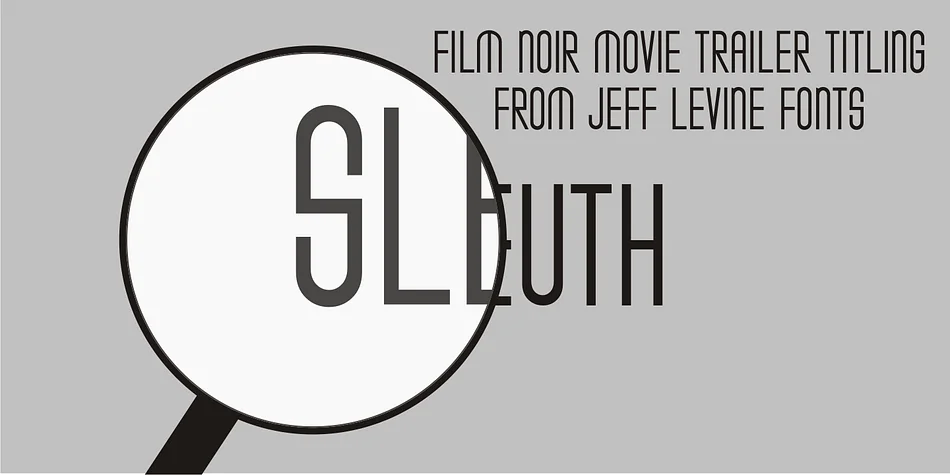
About SLEUTH JNL Font
This condensed typeface channels the sophisticated glamour of 1930s cinema with understated confidence. SLEUTH JNL, designed by Jeff Levine Fonts, captures the elegant letterforms that graced classic film title cards and promotional materials from Hollywood's golden age, when bold typography was central to a picture's visual identity and storytelling power.
Art Deco display fonts like this one shine for vintage-inspired event invitations, retro cocktail menus, indie film posters, and art deco branding packages. Its narrow proportions let you pack visual impact into tight spaces while maintaining the elegance of the era. The typeface works equally well for speakeasy signage, mystery-themed retail packaging, period-specific editorial layouts, or any design project that calls for that unmistakable interwar polish and authenticity. The condensed width makes it practical for headlines while keeping that classic, high-contrast appeal intact and readable.
Pair SLEUTH JNL with a neutral serif or clean geometric sans-serif for longer text blocks, since the display weight performs best at headline sizes and short bursts of text. Grab it from Creative Fabrica to bring a touch of classic Hollywood sophistication to your next design.
Style & Use Cases
- Overall Style
- Eye-catching, Bold
- Use Case
- Headlines, Logos
- Ideal For
- posters, branding, and social media graphics
- Pairs With
- a readable sans or serif for body
How to Install SLEUTH JNL Font
Step-by-step instructions for every platform
- 1Download the SLEUTH JNL font file (.ttf or .otf).
- 2Locate the downloaded file in your Downloads folder.
- 3Right-click the font file.
- 4Select "Install" to install for the current user, or "Install for all users" to make it available system-wide.
- 5SLEUTH JNL is now available in Word, Photoshop, Illustrator, and all other apps.
More by Jeff Levine Fonts
View all →



Browse fonts by theme
Curated collections →Saw a font in a picture? Identify any font from an image with our free Font Finder.
More Display Fonts
Browse all →







What pairs well with SLEUTH JNL Font?
SLEUTH JNL Font is a display font that shines as a display or heading face. Pair it with a clean sans-serif or serif font for body text — the contrast creates a clear hierarchy while the two styles stay balanced and easy to read.




SLEUTH JNL Font
Reviewed by the FontBoxDL team · Updated September 2026