 Firefox
About Simply Grotesk JNL Font
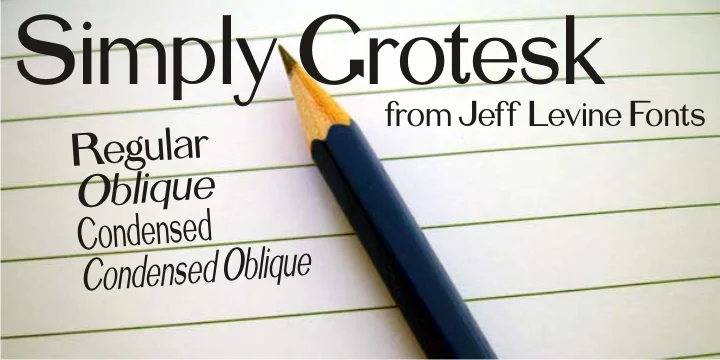
Simply Grotesk JNL by Jeff Levine Fonts is a vintage grotesk sans serif drawn directly from the early 1900s show card lettering traditions. When vinyl plotters and modern type design began reshaping how we created typography over the past century, this hand-lettered style was at the very heart of commercial design work. Levine carefully redrew that historical grotesk form digitally, preserving its sturdy character and no-nonsense appeal while maintaining the genuine craftsmanship evident in the original letterforms.
This typeface arrives in four variations: regular, oblique, condensed, and condensed oblique, offering you real flexibility for layout and emphasis across your designs. Its authentic 1900s bones work beautifully for vintage speakeasy menus, retro brewery branding, theater posters, craft shop signage, antique market logos, and vintage wedding suites. The straightforward geometry and genuinely legible letterforms keep everything readable even when used large or set in tight layouts, where that early-century swagger really matters and adds real character to your work.
If you're working on a project that needs that unpretentious, hand-drawn sanserif quality from a century ago, Simply Grotesk JNL is exactly what you're looking for. Get it on Creative Fabrica and start putting it to work in your designs.
Style & Use Cases
- Overall Style
- Eye-catching, Bold
- Use Case
- Headlines, Logos
- Ideal For
- posters, branding, and social media graphics
- Pairs With
- a readable sans or serif for body
How to Install Simply Grotesk JNL Font
Step-by-step instructions for every platform
- 1Download the Simply Grotesk JNL font file (.ttf or .otf).
- 2Locate the downloaded file in your Downloads folder.
- 3Right-click the font file.
- 4Select "Install" to install for the current user, or "Install for all users" to make it available system-wide.
- 5Simply Grotesk JNL is now available in Word, Photoshop, Illustrator, and all other apps.
More by Jeff Levine Fonts
View all →



Browse fonts by theme
Curated collections →Saw a font in a picture? Identify any font from an image with our free Font Finder.
More Display Fonts
Browse all →







What pairs well with Simply Grotesk JNL Font?
Simply Grotesk JNL Font is a display font that shines as a display or heading face. Pair it with a clean sans-serif or serif font for body text — the contrast creates a clear hierarchy while the two styles stay balanced and easy to read.




Simply Grotesk JNL Font
Reviewed by the FontBoxDL team · Updated September 2026