 Firefox
 1 / 2
1 / 2About SIGN SHOP DECO JNL Font
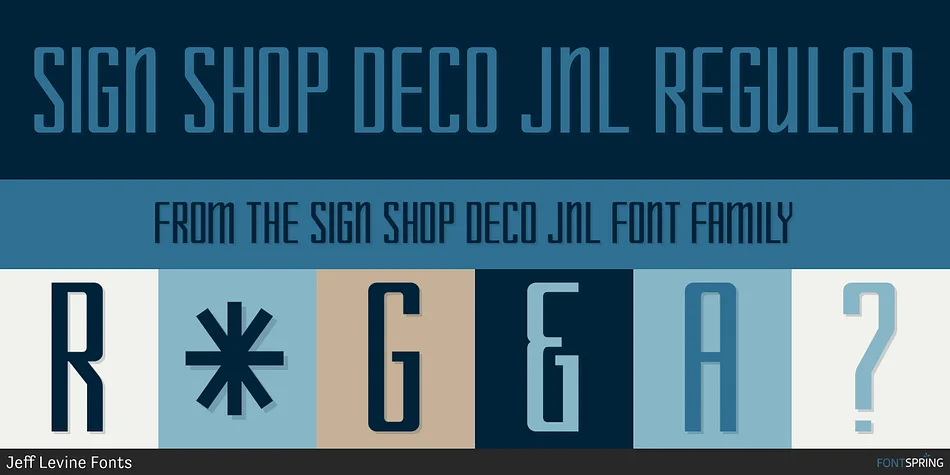
SIGN SHOP DECO JNL by Jeff Levine Fonts is a geometric display typeface inspired by 1920s ceramic titling letters and hand-painted storefront signage styles. The font channels authentic vintage charm through its clean, structured lines and distinctive Art Deco character that feels both bold and visually refined. Available in three weights (Bold, Deco, and Oblique versions), it offers genuine flexibility to create layered, dynamic compositions or punch through with a single bold weight for commanding focal headlines.
This typeface shines on retro cafe menu designs, vintage storefront signage, and 1920s-themed event materials where period accuracy matters to your story. Graphic designers often reach for it when building art deco wedding invitation suites, restaurant branding systems, or cosmetics packaging that leans into nostalgic aesthetics. Boutique labels and craft-focused product boxes benefit immensely from its handmade warmth without sacrificing legibility or professional polish. The geometric letterforms work beautifully whether scaled down for small-point print or blown up large for environmental graphics, making it a dependable choice for poster work and window signage that demands authentic period character.
Get SIGN SHOP DECO JNL on Creative Fabrica and bring that classic mid-century charm to your next design project.
Style & Use Cases
- Overall Style
- Eye-catching, Bold
- Use Case
- Headlines, Logos
- Ideal For
- posters, branding, and social media graphics
- Pairs With
- a readable sans or serif for body
How to Install SIGN SHOP DECO JNL Font
Step-by-step instructions for every platform
- 1Download the SIGN SHOP DECO JNL font file (.ttf or .otf).
- 2Locate the downloaded file in your Downloads folder.
- 3Right-click the font file.
- 4Select "Install" to install for the current user, or "Install for all users" to make it available system-wide.
- 5SIGN SHOP DECO JNL is now available in Word, Photoshop, Illustrator, and all other apps.
More by Jeff Levine Fonts
View all →



Browse fonts by theme
Curated collections →Saw a font in a picture? Identify any font from an image with our free Font Finder.
More Display Fonts
Browse all →







What pairs well with SIGN SHOP DECO JNL Font?
SIGN SHOP DECO JNL Font is a display font that shines as a display or heading face. Pair it with a clean sans-serif or serif font for body text — the contrast creates a clear hierarchy while the two styles stay balanced and easy to read.




SIGN SHOP DECO JNL Font
Reviewed by the FontBoxDL team · Updated September 2026