 Firefox
 1 / 5
1 / 5About SHATTERED DREAMS JNL Font
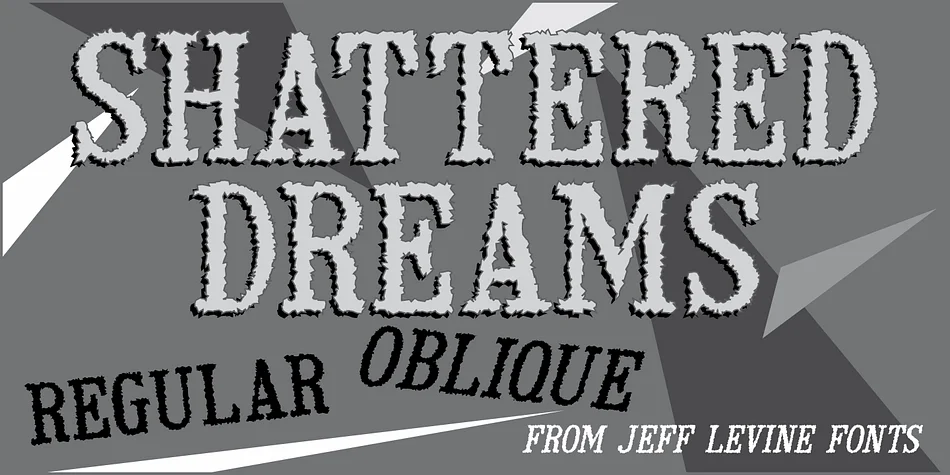
Picture yourself designing a concert poster or album cover that needs genuine visual grit and attitude. Shattered Dreams JNL from Jeff Levine Fonts delivers exactly that kind of raw, distressed character. This display typeface is a deliberately fractured interpretation of classic adhesive serif letters, originally inspired by vintage gummed letterforms that once appeared on old wooden signage around storefronts and markets. The jagged, fragmented edges create a distinctive layered texture that resembles scattered iron filings pulled toward a magnet, giving each character an organic, broken-glass feel.
You'll find this font works exceptionally well for grunge concert posters, distressed vintage album artwork, and horror movie titles that demand visual impact. It's equally at home on punk rock merchandise, weathered vintage poster designs, and any branding project seeking that authentically worn aesthetic. The letterforms stay legible even at larger display sizes, making it suitable as your primary display typeface without straining readability or losing its character.
Shattered Dreams JNL comes in both regular and oblique versions, giving you stylistic flexibility for different design directions and applications. The broken edges read clearly at substantial display sizes, so you can build entire compositions around this typeface confidently. Grab it from Creative Fabrica and bring that time-weathered texture to your next project.
Style & Use Cases
- Overall Style
- Eye-catching, Bold
- Use Case
- Headlines, Logos
- Ideal For
- posters, branding, and social media graphics
- Pairs With
- a readable sans or serif for body
How to Install SHATTERED DREAMS JNL Font
Step-by-step instructions for every platform
- 1Download the SHATTERED DREAMS JNL font file (.ttf or .otf).
- 2Locate the downloaded file in your Downloads folder.
- 3Right-click the font file.
- 4Select "Install" to install for the current user, or "Install for all users" to make it available system-wide.
- 5SHATTERED DREAMS JNL is now available in Word, Photoshop, Illustrator, and all other apps.
More by Jeff Levine Fonts
View all →



Browse fonts by theme
Curated collections →Saw a font in a picture? Identify any font from an image with our free Font Finder.
More Display Fonts
Browse all →







What pairs well with SHATTERED DREAMS JNL Font?
SHATTERED DREAMS JNL Font is a display font that shines as a display or heading face. Pair it with a clean sans-serif or serif font for body text — the contrast creates a clear hierarchy while the two styles stay balanced and easy to read.




SHATTERED DREAMS JNL Font
Reviewed by the FontBoxDL team · Updated September 2026