 Firefox
 1 / 8
1 / 8About Scary Bat Font
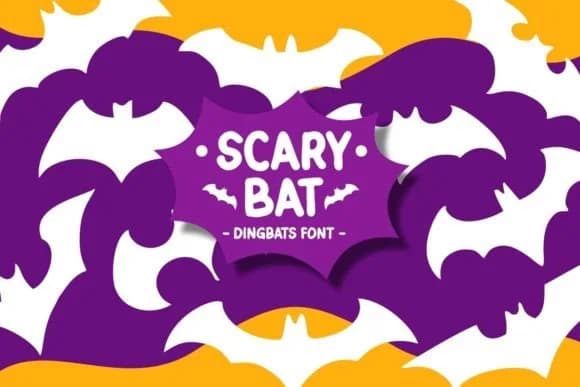
You're designing Halloween stickers for a craft brand and need artwork that feels fresh and hand-drawn rather than digital-slick. Scary Bat, created by Pian45, is a dingbat font that swaps regular letters for a collection of playful bat characters, each with its own pose and personality. Instead of hunting through clipart libraries, you get instant variety by typing different keys to access different bat glyphs.
This font shines across Halloween decoration stickers, trick-or-treat invitation suites, boutique seasonal product packaging, and DIY greeting card embellishments. Craft makers layer the bats into paper designs for handmade card accents, while Etsy product creators use them to build spooky borders and corner elements on listing graphics. The hand-drawn linework keeps the overall vibe playful rather than genuinely frightening, which makes it work just as well for children's Halloween designs as it does for more sophisticated, moody projects aimed at adults.
Since the font works across a wide size range and is structured as SVG-compatible cuts, it integrates directly with cutting machines and print files. The variety of poses means you can build complex patterns or use individual bats as spot elements throughout your layouts. Find it on Creative Fabrica and add it to your seasonal design toolkit.
Style & Use Cases
- Overall Style
- Iconographic, Scary Fonts
- Use Case
- Icons, Accents
- Ideal For
- ornaments, bullets, and decorative flourishes
- Pairs With
- any text font
How to Install Scary Bat Font
Step-by-step instructions for every platform
- 1Download the Scary Bat font file (.ttf or .otf).
- 2Locate the downloaded file in your Downloads folder.
- 3Right-click the font file.
- 4Select "Install" to install for the current user, or "Install for all users" to make it available system-wide.
- 5Scary Bat is now available in Word, Photoshop, Illustrator, and all other apps.
Browse fonts by theme
Curated collections →Saw a font in a picture? Identify any font from an image with our free Font Finder.
More Dingbats Fonts
Browse all →







What pairs well with Scary Bat Font?
Scary Bat Font is a versatile dingbats font that works for both headings and body text. Pair it with a contrasting sans-serif or serif font to add visual interest and a clear distinction between titles and body copy.



Scary Bat Font
by Pian45
Reviewed by the FontBoxDL team · Updated July 2026