 Firefox
 1 / 6
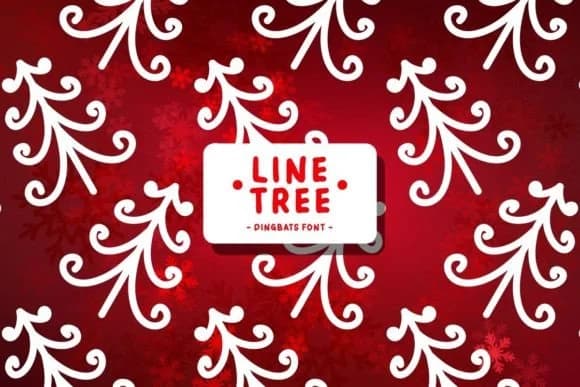
1 / 6About Line Tree Font
You're designing a holiday package suite for a small boutique, and those generic ornament icons simply won't cut it for the aesthetic you're after. Line Tree from Pian45 solves that problem by offering a complete library of hand-drawn-style winter symbols and decorative elements, all tucked into a single dingbats font. Every character represents a different tree variation, ornament doodle, or seasonal graphic, so you can assemble custom layouts without hunting through image libraries or switching between multiple plugins.
This font delivers for several specific applications: creating holiday greeting card suites, designing hand-lettered gift tag collections, building sticker sheet designs for Etsy sellers, and crafting personalized ornament labels. Children's book illustrators rely on it for festive seasonal spreads, while classroom teachers use it to design winter bulletin board displays with genuine personality. Since the entire font is built from vector-based line art, you keep full creative control, able to recolor, scale, and layer elements freely across print and digital. The consistent stroke weight ensures every motif stays crisp and readable even at small sizes, so your gift tags, stickers, and package inserts maintain clarity. Grab Line Tree from Creative Fabrica, and you'll always have custom tree graphics ready for any holiday project.
Style & Use Cases
- Overall Style
- Iconographic, Dingbats Fonts
- Use Case
- Icons, Accents
- Ideal For
- ornaments, bullets, and decorative flourishes
- Pairs With
- any text font
How to Install Line Tree Font
Step-by-step instructions for every platform
- 1Download the Line Tree font file (.ttf or .otf).
- 2Locate the downloaded file in your Downloads folder.
- 3Right-click the font file.
- 4Select "Install" to install for the current user, or "Install for all users" to make it available system-wide.
- 5Line Tree is now available in Word, Photoshop, Illustrator, and all other apps.
Browse fonts by theme
Curated collections →Saw a font in a picture? Identify any font from an image with our free Font Finder.
More Dingbats Fonts
Browse all →







What pairs well with Line Tree Font?
Line Tree Font is a versatile dingbats font that works for both headings and body text. Pair it with a contrasting sans-serif or serif font to add visual interest and a clear distinction between titles and body copy.



Line Tree Font
by Pian45
Reviewed by the FontBoxDL team · Updated June 2026