 Firefox
 1 / 2
1 / 2About Coriander® Std Font
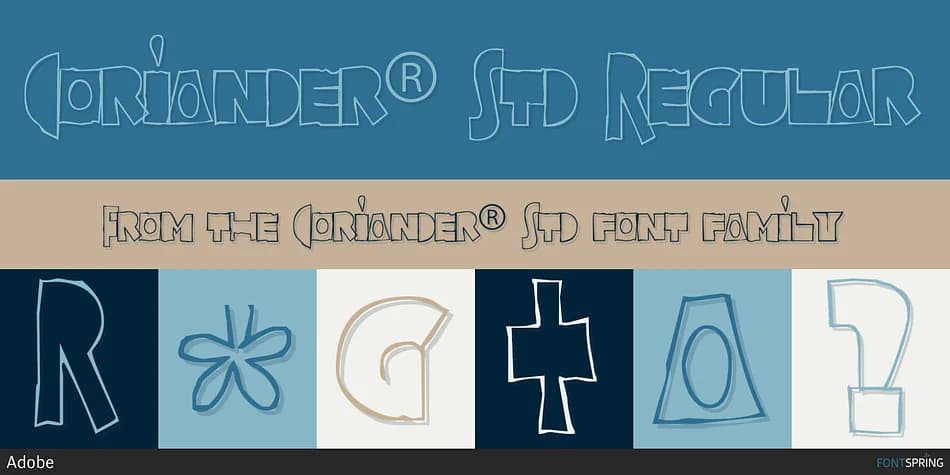
Coriander® Std captures the spontaneity of a hand-drawn moment frozen in type, created by Tim Donaldson, an Adobe designer with deep expertise in handwriting and letterform design. The font's organic, slightly irregular strokes emerge from an accidental discovery: Donaldson sketched the word "Coriander" one afternoon, and when the paper fell from his pocket weeks later, he felt compelled to complete two full alphabets by hand in his sketchbook. That naturalistic quality, rooted in actual pen work rather than mechanical perfection, gives Coriander its distinctive warmth and unmistakable human touch.
Digitization brought Donaldson's hand-drawn characters to screen through careful translation using a Wacom tablet, with screen refinement that preserves the intentional imperfections making the font feel genuine and alive. This character shines for projects that demand personality over formality: custom wedding invitation suites, artisanal food packaging and labels, handmade-style greeting cards, and independent book covers for literary or illustrated fiction. The letterforms carry enough weight and visual presence to stand out without becoming overwrought or precious, a rare balance in decorative typefaces.
Coriander suits designers and creatives building branded materials with warmth, authenticity, and genuine hand-crafted sensibility. Find this decorative typeface on Creative Fabrica and bring its distinct character to your next creative project.
Style & Use Cases
- Overall Style
- Bold, Distinctive
- Use Case
- Headlines, Posters
- Ideal For
- logos, packaging, and standout titles
- Pairs With
- a neutral sans-serif
How to Install Coriander® Std Font
Step-by-step instructions for every platform
- 1Download the Coriander® Std font file (.ttf or .otf).
- 2Locate the downloaded file in your Downloads folder.
- 3Right-click the font file.
- 4Select "Install" to install for the current user, or "Install for all users" to make it available system-wide.
- 5Coriander® Std is now available in Word, Photoshop, Illustrator, and all other apps.


Browse fonts by theme
Curated collections →Saw a font in a picture? Identify any font from an image with our free Font Finder.
More Decorative Fonts
Browse all →







What pairs well with Coriander® Std Font?
Coriander® Std Font is a decorative font that shines as a display or heading face. Pair it with a clean sans-serif or serif font for body text — the contrast creates a clear hierarchy while the two styles stay balanced and easy to read.



Coriander® Std Font
by Adobe
Reviewed by the FontBoxDL team · Updated June 2026