 Firefox
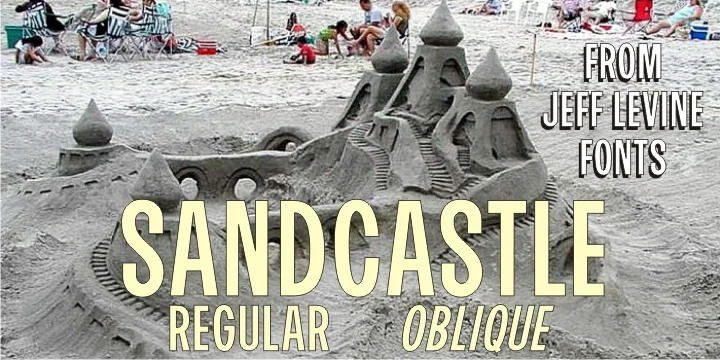
About SANDCASTLE JNL Font
There's something instantly nostalgic and playful about a good mid-century typeface. Sandcastle JNL, designed by Jeff Levine, brings that breezy 50s-60s aesthetic to life with a casual confidence that feels both deeply retro and genuinely timeless. Its letterforms carry that characteristic hand-drawn quality of period design, but with enough underlying structure to read cleanly at any size. There's no pretension here, just honest, friendly letterwork.
This typeface thrives wherever you need personality and warmth to shine through. Picture vintage diner menus, retro-style business cards for creative agencies, band posters with that kitschy throwback appeal, or product labels for craft sodas and artisan chocolates. That informal bounce of the letters gives any project an immediate sense of play and accessibility. On websites it brings real character to headers and hero sections. In print, it feels equally at home on postcards, vintage-inspired labels, or signage for a boutique shop. The personality doesn't fade, no matter how you use it or what context it appears in.
Pair Sandcastle JNL with a clean geometric sans for body text, and you create a real balance between quirk and readability. You'll find it on Creative Fabrica, ready to add that warm, nostalgic energy to your next project.
Style & Use Cases
- Overall Style
- Eye-catching, Bold
- Use Case
- Headlines, Logos
- Ideal For
- posters, branding, and social media graphics
- Pairs With
- a readable sans or serif for body
How to Install SANDCASTLE JNL Font
Step-by-step instructions for every platform
- 1Download the SANDCASTLE JNL font file (.ttf or .otf).
- 2Locate the downloaded file in your Downloads folder.
- 3Right-click the font file.
- 4Select "Install" to install for the current user, or "Install for all users" to make it available system-wide.
- 5SANDCASTLE JNL is now available in Word, Photoshop, Illustrator, and all other apps.
More by Jeff Levine Fonts
View all →



Browse fonts by theme
Curated collections →Saw a font in a picture? Identify any font from an image with our free Font Finder.
More Display Fonts
Browse all →







What pairs well with SANDCASTLE JNL Font?
SANDCASTLE JNL Font is a display font that shines as a display or heading face. Pair it with a clean sans-serif or serif font for body text — the contrast creates a clear hierarchy while the two styles stay balanced and easy to read.




SANDCASTLE JNL Font
Reviewed by the FontBoxDL team · Updated October 2026