 Firefox
 1 / 2
1 / 2About SALES BOOK JNL Font
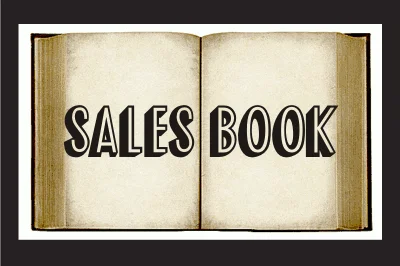
Salvaged from the wood type drawers of a vintage printer's supply catalog, Sales Book JNL captures the bold, substantial character of early 20th-century display typography. Designed by Jeff Levine Fonts, this typeface channels that authentic industrial aesthetic without requiring any restoration or modification. The letterforms carry the weight and presence of genuine metal and wood types, making them instantly recognizable and genuinely commanding on whatever surface they occupy.
This typeface excels across numerous practical design contexts. Speakeasy-style bar menus gain legitimate historical credibility when set in these characters. Vintage apothecary labels feel authentic and period-appropriate without any visual strain. Antique shop signage benefits from the worn-in authority the font inherently carries. Classic cinema posters, nostalgic product packaging, and period-accurate craft fair materials all find ideal homes here, where designers need convincing historical flavor without resorting to force or artifice. The overall construction is sturdy and carries genuine visual heft, lending an unmistakable heirloom quality to whatever gets printed.
Sales Book JNL works best for designers and makers who want genuine vintage aesthetics rather than modern shortcuts or clever approximations. You'll find it on Creative Fabrica, where it's ready to contribute that real character and historical edge to your next project.
Style & Use Cases
- Overall Style
- Eye-catching, Bold
- Use Case
- Headlines, Logos
- Ideal For
- posters, branding, and social media graphics
- Pairs With
- a readable sans or serif for body
How to Install SALES BOOK JNL Font
Step-by-step instructions for every platform
- 1Download the SALES BOOK JNL font file (.ttf or .otf).
- 2Locate the downloaded file in your Downloads folder.
- 3Right-click the font file.
- 4Select "Install" to install for the current user, or "Install for all users" to make it available system-wide.
- 5SALES BOOK JNL is now available in Word, Photoshop, Illustrator, and all other apps.
More by Jeff Levine Fonts
View all →



Browse fonts by theme
Curated collections →Saw a font in a picture? Identify any font from an image with our free Font Finder.
More Display Fonts
Browse all →







What pairs well with SALES BOOK JNL Font?
SALES BOOK JNL Font is a display font that shines as a display or heading face. Pair it with a clean sans-serif or serif font for body text — the contrast creates a clear hierarchy while the two styles stay balanced and easy to read.




SALES BOOK JNL Font
Reviewed by the FontBoxDL team · Updated October 2026