 Firefox
 1 / 5
1 / 5About ROTISSERIE MENU JNL Font
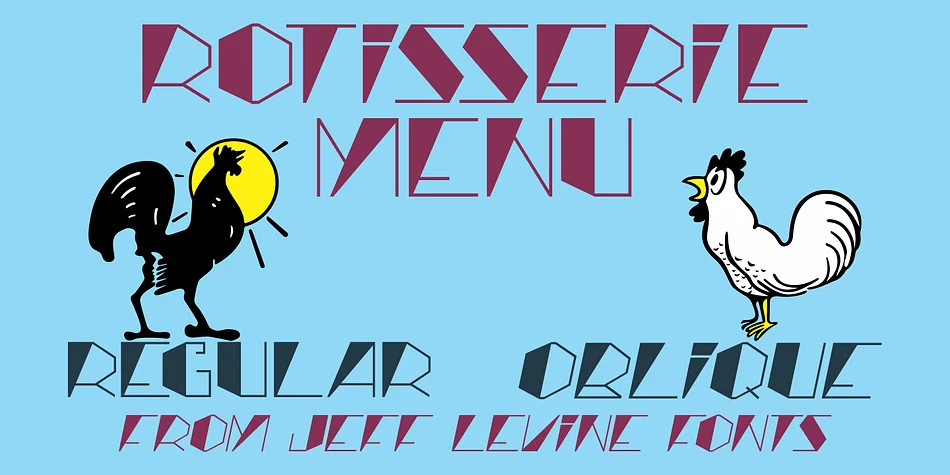
ROTISSERIE MENU JNL by Jeff Levine Fonts captures the essence of Art Nouveau typography from a 1928 restaurant menu, where hand lettering inspired this display typeface. The angular letterforms are built from deliberately contrasting thick and thin strokes, creating an eccentric charm that feels refined rather than chaotic. Each character strikes that delicate balance between authenticity and usability, working precisely because of its imperfections and handmade quirks. These details remind viewers they're looking at something genuinely historical rather than a sterile imitation of vintage style.
This typeface shines in contexts where vintage sophistication carries real weight and credibility. Vintage cocktail bar menus, speakeasy poster designs, heritage restaurant branding, and retro packaging for artisanal goods all benefit from its period-authentic presence. Museum exhibition materials, gallery signage, and independent restaurants revamping their visual identity frequently employ fonts like this when the goal is conveying genuine historical character rather than simply evoking a nostalgic mood. The face arrives in regular and oblique versions, giving you flexibility to build dynamic compositions while maintaining that 1920s aesthetic throughout your work. Designers working on wine lists, vintage product launches, or exhibition materials with historical weight consistently find this typeface delivers the authenticity their projects need. Find Rotisserie Menu JNL on Creative Fabrica to add this distinctive Art Nouveau voice to your designs.
Style & Use Cases
- Overall Style
- Eye-catching, Bold
- Use Case
- Headlines, Logos
- Ideal For
- posters, branding, and social media graphics
- Pairs With
- a readable sans or serif for body
How to Install ROTISSERIE MENU JNL Font
Step-by-step instructions for every platform
- 1Download the ROTISSERIE MENU JNL font file (.ttf or .otf).
- 2Locate the downloaded file in your Downloads folder.
- 3Right-click the font file.
- 4Select "Install" to install for the current user, or "Install for all users" to make it available system-wide.
- 5ROTISSERIE MENU JNL is now available in Word, Photoshop, Illustrator, and all other apps.
More by Jeff Levine Fonts
View all →



Browse fonts by theme
Curated collections →Saw a font in a picture? Identify any font from an image with our free Font Finder.
More Display Fonts
Browse all →







What pairs well with ROTISSERIE MENU JNL Font?
ROTISSERIE MENU JNL Font is a display font that shines as a display or heading face. Pair it with a clean sans-serif or serif font for body text — the contrast creates a clear hierarchy while the two styles stay balanced and easy to read.




ROTISSERIE MENU JNL Font
Reviewed by the FontBoxDL team · Updated September 2026