 Firefox
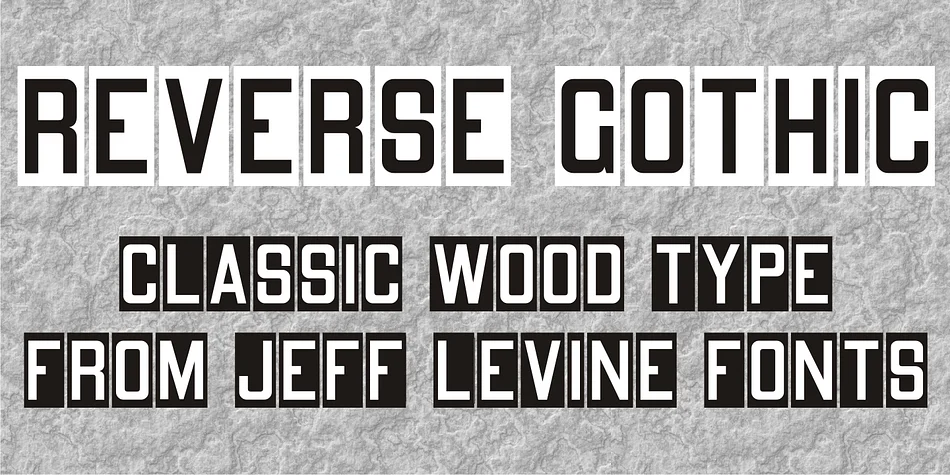
About REVERSE GOTHIC JNL Font
REVERSE GOTHIC JNL by Jeff Levine Fonts captures the raw impact of classic reverse-printed letterpress blocks, the kind that shine brightest when rendered as white-on-black for maximum dramatic contrast. This display typeface delivers that retro punch without any softness in its construction, harking back to a time when bold typography meant serious business.
The blocky, deliberate letterforms make this font a natural fit for band posters and album artwork where vintage music aesthetics really matter. You'll find it equally useful for record store signage, indie record label branding, and gritty designs aimed at speakeasies or vintage clothing boutiques. Comic book covers and retro gaming graphics both benefit from its confident weight, while art deco-influenced packaging and high-contrast book designs also play to this typeface's raw strengths.
Because the font's thick strokes and punchy letterforms were built for maximum visibility, it shines brightest when set large across posters, packaging, and bold headlines where breathing room works in its favor. The straightforward character set supports English and most Latin-based languages, making it accessible for broader international projects. Pick up REVERSE GOTHIC JNL on Creative Fabrica and bring that authentic letterpress edge to your next striking headline.
Style & Use Cases
- Overall Style
- Eye-catching, Bold
- Use Case
- Headlines, Logos
- Ideal For
- posters, branding, and social media graphics
- Pairs With
- a readable sans or serif for body
How to Install REVERSE GOTHIC JNL Font
Step-by-step instructions for every platform
- 1Download the REVERSE GOTHIC JNL font file (.ttf or .otf).
- 2Locate the downloaded file in your Downloads folder.
- 3Right-click the font file.
- 4Select "Install" to install for the current user, or "Install for all users" to make it available system-wide.
- 5REVERSE GOTHIC JNL is now available in Word, Photoshop, Illustrator, and all other apps.
More by Jeff Levine Fonts
View all →



Browse fonts by theme
Curated collections →Saw a font in a picture? Identify any font from an image with our free Font Finder.
More Display Fonts
Browse all →







What pairs well with REVERSE GOTHIC JNL Font?
REVERSE GOTHIC JNL Font is a display font that shines as a display or heading face. Pair it with a clean sans-serif or serif font for body text — the contrast creates a clear hierarchy while the two styles stay balanced and easy to read.




REVERSE GOTHIC JNL Font
Reviewed by the FontBoxDL team · Updated September 2026