 Firefox
 1 / 6
1 / 6About Retro Signs JNL Font
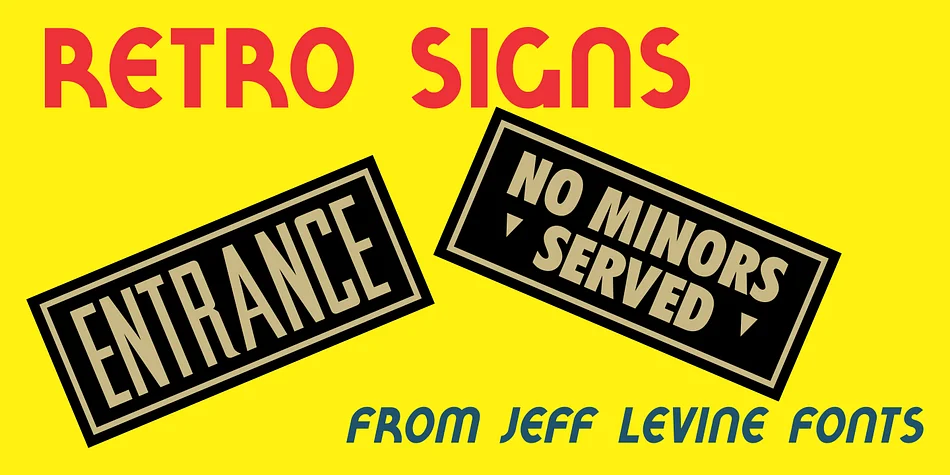
Retro Signs JNL pulls directly from the hand-lettered aesthetic of 1950s and early 1960s water transfer decals, capturing that authentic mid-century character that feels lived-in and warm. Created by Jeff Levine Fonts, this display typeface features nearly 50 individual panel designs originally drawn for the Duro Decal Company of Chicago, Illinois, with additional lettering styled to match the vintage hand-drawn quality and charm.
The letterforms have that chunky, friendly warmth typical of diner signage from the era. You can use this font for diner menus and storefront signage, vintage barber shop window displays, retro garage and service station designs, or antique store signage where period authenticity matters. It pairs well with craft beer labels leaning into nostalgia, mid-century themed wedding direction cards, or branding for restaurants and shops celebrating their throwback roots. Each character carries the slight irregularities and imperfections you'd find in actual hand-painted commercial work from decades past, adding genuineness that digital fonts often miss.
This typeface suits designers building cohesive 1950s-inspired brand systems or one-off nostalgic projects that need genuine vintage energy rather than a sterile digital imitation. Restaurants, shops, and event planners all find authentic character in the letterforms. You can grab Retro Signs JNL on Creative Fabrica and start bringing that period-perfect signage to your work.
Style & Use Cases
- Overall Style
- Eye-catching, Bold
- Use Case
- Headlines, Logos
- Ideal For
- posters, branding, and social media graphics
- Pairs With
- a readable sans or serif for body
How to Install Retro Signs JNL Font
Step-by-step instructions for every platform
- 1Download the Retro Signs JNL font file (.ttf or .otf).
- 2Locate the downloaded file in your Downloads folder.
- 3Right-click the font file.
- 4Select "Install" to install for the current user, or "Install for all users" to make it available system-wide.
- 5Retro Signs JNL is now available in Word, Photoshop, Illustrator, and all other apps.
More by Jeff Levine Fonts
View all →



Browse fonts by theme
Curated collections →Saw a font in a picture? Identify any font from an image with our free Font Finder.
More Display Fonts
Browse all →







What pairs well with Retro Signs JNL Font?
Retro Signs JNL Font is a display font that shines as a display or heading face. Pair it with a clean sans-serif or serif font for body text — the contrast creates a clear hierarchy while the two styles stay balanced and easy to read.




Retro Signs JNL Font
Reviewed by the FontBoxDL team · Updated September 2026