 Firefox
About RESTAURANT AND LOUNGE JNL Font
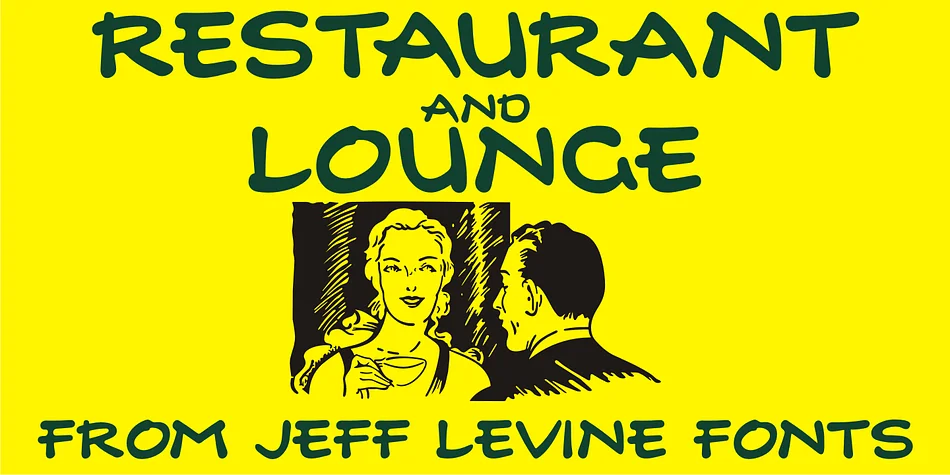
With its loose, handmade brushstrokes and laid-back energy, Restaurant and Lounge JNL by Jeff Levine Fonts captures the spirit of 1940s hand lettering. Its character derives from vintage type found on a matchbook for the Park Avenue Restaurant, a storied Miami Beach dining destination during the city's most glamorous postwar years.
This display font works beautifully for projects that need warmth and personality. Consider it for vintage bar menus, speakeasy-inspired party invitations, retro diner signage, and craft cocktail labels that call back to mid-century style. Its casual, human quality reads as approachable rather than overly formal, making it equally suited for restaurant branding, event posters, and nostalgic product labels. Genuine handwritten letterforms photograph well on signage, packaging, and print collateral for brands that lean into their heritage.
Restaurant and Lounge JNL finds its home in the hands of designers and boutique business owners who want authentic vintage character without relying on generic retro tropes. Capturing a specific moment in design history, this font channels the glamorous, casual sophistication of mid-century Miami nightlife into contemporary work. It's the kind of typeface that rewards good spacing and thoughtful color choices. You'll find it on Creative Fabrica, ready to add genuine vintage flair to your next project.
Style & Use Cases
- Overall Style
- Eye-catching, Bold
- Use Case
- Headlines, Logos
- Ideal For
- posters, branding, and social media graphics
- Pairs With
- a readable sans or serif for body
How to Install RESTAURANT AND LOUNGE JNL Font
Step-by-step instructions for every platform
- 1Download the RESTAURANT AND LOUNGE JNL font file (.ttf or .otf).
- 2Locate the downloaded file in your Downloads folder.
- 3Right-click the font file.
- 4Select "Install" to install for the current user, or "Install for all users" to make it available system-wide.
- 5RESTAURANT AND LOUNGE JNL is now available in Word, Photoshop, Illustrator, and all other apps.
More by Jeff Levine Fonts
View all →



Browse fonts by theme
Curated collections →Saw a font in a picture? Identify any font from an image with our free Font Finder.
More Display Fonts
Browse all →







What pairs well with RESTAURANT AND LOUNGE JNL Font?
RESTAURANT AND LOUNGE JNL Font is a display font that shines as a display or heading face. Pair it with a clean sans-serif or serif font for body text — the contrast creates a clear hierarchy while the two styles stay balanced and easy to read.




RESTAURANT AND LOUNGE JNL Font
Reviewed by the FontBoxDL team · Updated June 2026