 Firefox
 1 / 6
1 / 6About RADIO BROADCAST JNL Font
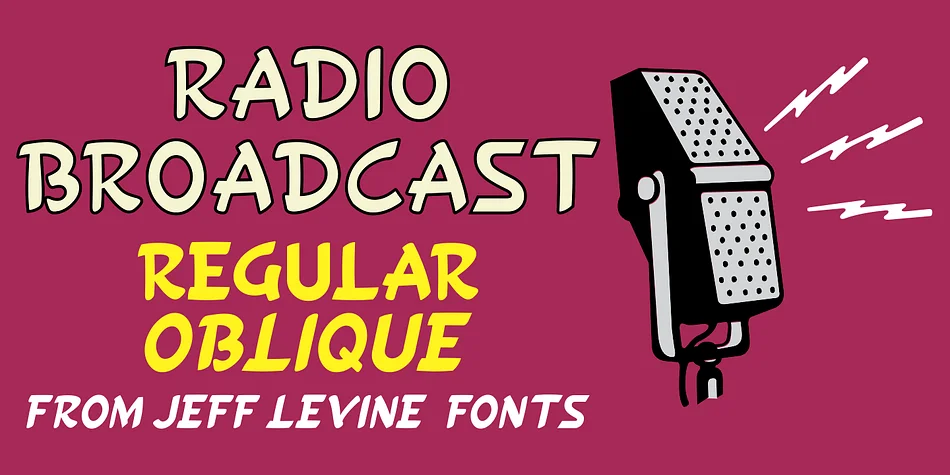
Hand-drawn strokes give this sans serif its distinctive character, capturing the energetic headlines that defined 1930s graphic design. RADIO BROADCAST JNL, designed by Jeff Levine Fonts, distills the spirit of a 1938 issue of Radio Stars magazine into a typeface that feels both authentic and immediately approachable. The letterforms carry the imperfect charm of brushwork, where each stroke shows intention without mechanical precision.
This font thrives on projects that want that pre-war magazine energy and editorial personality. Vintage record label packaging, speakeasy and craft brewery branding, retro podcast series artwork, and 1930s-themed event invitations all benefit from its casual-meets-professional voice. You could pair it with serif details for vintage book covers or use it standalone for automotive shop signage that needs historical period character. The informal structure makes it readable at display sizes while maintaining enough personality that smaller applications still register.
Designers hunting for authentic retro aesthetics without the polished sterility of digital fonts will find that RADIO BROADCAST JNL addresses a specific and underserved niche. Grab it on Creative Fabrica to add this slice of mid-century print culture to your design collection.
Style & Use Cases
- Overall Style
- Eye-catching, Bold
- Use Case
- Headlines, Logos
- Ideal For
- posters, branding, and social media graphics
- Pairs With
- a readable sans or serif for body
How to Install RADIO BROADCAST JNL Font
Step-by-step instructions for every platform
- 1Download the RADIO BROADCAST JNL font file (.ttf or .otf).
- 2Locate the downloaded file in your Downloads folder.
- 3Right-click the font file.
- 4Select "Install" to install for the current user, or "Install for all users" to make it available system-wide.
- 5RADIO BROADCAST JNL is now available in Word, Photoshop, Illustrator, and all other apps.
More by Jeff Levine Fonts
View all →



Browse fonts by theme
Curated collections →Saw a font in a picture? Identify any font from an image with our free Font Finder.
More Display Fonts
Browse all →







What pairs well with RADIO BROADCAST JNL Font?
RADIO BROADCAST JNL Font is a display font that shines as a display or heading face. Pair it with a clean sans-serif or serif font for body text — the contrast creates a clear hierarchy while the two styles stay balanced and easy to read.




RADIO BROADCAST JNL Font
Reviewed by the FontBoxDL team · Updated June 2026