 Firefox
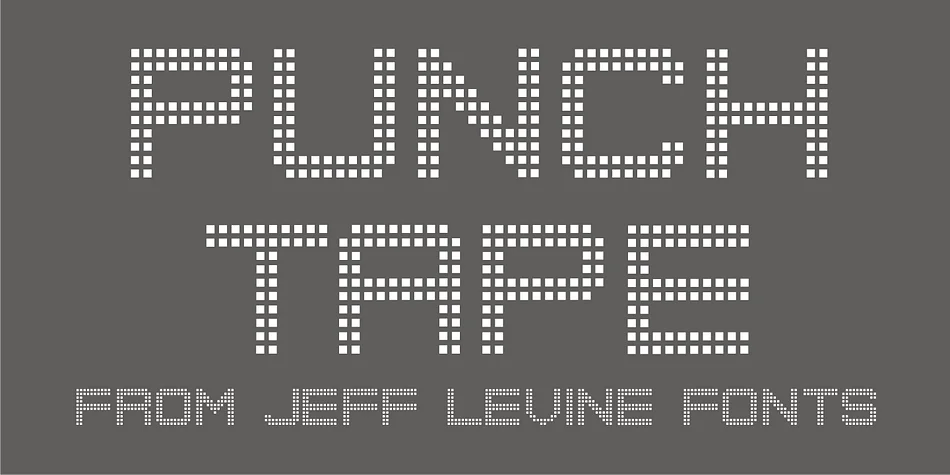
About Punch Tape JNL Font
This typeface channels nostalgic mechanical charm with a distinctly industrial personality. Punch Tape JNL, designed by Jeff Levine Fonts, draws its visual language from the perforated paper tapes that once powered stock tickers, scrolling marquee signage, and the earliest computer typesetting equipment. Each character is punctuated by square dots rather than the rounded holes of standard interpretations, giving the font a subtly distinct textural quality that rewards close inspection.
The font shines for retro concert posters, vintage-inspired product labels, and steampunk-themed event invitations where that analogue-era sensibility rings true rather than kitschy. It works just as well for DIY nostalgic signage projects or any design that needs to evoke mid-century technology with real character and specificity. The mechanical repetition of the perforated-tape structure gives layouts an unmistakable retro-tech edge without requiring elaborate illustration work or additional decorative elements to sell the concept.
There's something honest about using a font born from functional machinery to communicate alongside contemporary design. Pair Punch Tape JNL with a clean, modern sans-serif for body copy to create contrast and ensure readability while letting this display typeface carry the visual weight. Add it to your Creative Fabrica library and start building designs with genuine vintage depth.
Style & Use Cases
- Overall Style
- Eye-catching, Bold
- Use Case
- Headlines, Logos
- Ideal For
- posters, branding, and social media graphics
- Pairs With
- a readable sans or serif for body
How to Install Punch Tape JNL Font
Step-by-step instructions for every platform
- 1Download the Punch Tape JNL font file (.ttf or .otf).
- 2Locate the downloaded file in your Downloads folder.
- 3Right-click the font file.
- 4Select "Install" to install for the current user, or "Install for all users" to make it available system-wide.
- 5Punch Tape JNL is now available in Word, Photoshop, Illustrator, and all other apps.
More by Jeff Levine Fonts
View all →



Browse fonts by theme
Curated collections →Saw a font in a picture? Identify any font from an image with our free Font Finder.
More Display Fonts
Browse all →







What pairs well with Punch Tape JNL Font?
Punch Tape JNL Font is a display font that shines as a display or heading face. Pair it with a clean sans-serif or serif font for body text — the contrast creates a clear hierarchy while the two styles stay balanced and easy to read.




Punch Tape JNL Font
Reviewed by the FontBoxDL team · Updated September 2026