 Firefox
 1 / 4
1 / 4About Pineapple Head Font
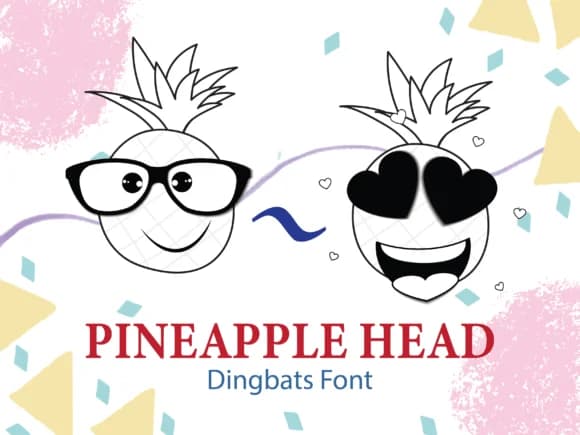
Pineapple Head, designed by Happy Bamboo, is a dingbat font where each character is a tropical fruit wearing a distinct mood. Instead of traditional letters and numbers, you get expressive pineapples ranging from genuinely happy to downright melancholy, with several stops at wildly goofy in between. The vector-based characters scale cleanly at any size without loss of quality, making them equally effective on printed materials and screen-based designs where detail matters.
This font thrives on playful projects that benefit from visual personality. Consider using it for birthday party invitation suites where each card tells its own emotional story through the pineapple choice. Classroom bulletin board decorations come alive when you swap out plain text for these expressive characters. Beach-themed product labels for handmade goods (think jam jars, soap boxes, or craft items sold on Etsy) gain immediate charm and approachability. Even simple DIY gift tags transform when each label wears a pineapple with personality. Each expression opens up genuine visual storytelling, letting you show emotion through the fruit itself rather than depending only on surrounding typography.
This font works best for illustrators, party planners, and educators building fun, lighthearted content that prioritizes character over formality. Look for it on Creative Fabrica when you need personality that doesn't compromise on playfulness.
Style & Use Cases
- Overall Style
- Iconographic, Comic Fonts
- Use Case
- Icons, Accents
- Ideal For
- ornaments, bullets, and decorative flourishes
- Pairs With
- any text font
How to Install Pineapple Head Font
Step-by-step instructions for every platform
- 1Download the Pineapple Head font file (.ttf or .otf).
- 2Locate the downloaded file in your Downloads folder.
- 3Right-click the font file.
- 4Select "Install" to install for the current user, or "Install for all users" to make it available system-wide.
- 5Pineapple Head is now available in Word, Photoshop, Illustrator, and all other apps.
More by Happy Bamboo
View all →
Browse fonts by theme
Curated collections →Saw a font in a picture? Identify any font from an image with our free Font Finder.
More Dingbats Fonts
Browse all →







What pairs well with Pineapple Head Font?
Pineapple Head Font is a versatile dingbats font that works for both headings and body text. Pair it with a contrasting sans-serif or serif font to add visual interest and a clear distinction between titles and body copy.



Pineapple Head Font
by Happy Bamboo
Reviewed by the FontBoxDL team · Updated July 2026