 Firefox
 1 / 5
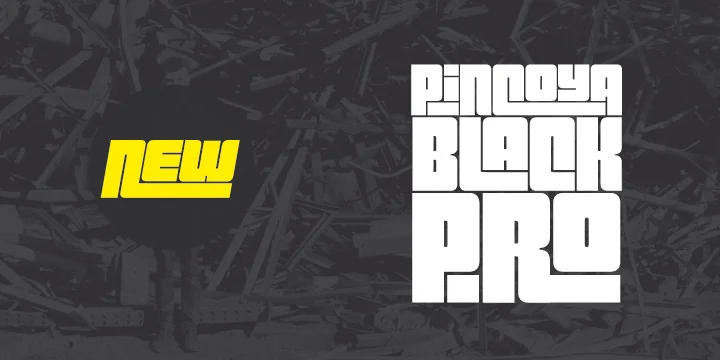
1 / 5About Pincoya Black Pro Font
Pincoya Black Pro by Latinotype is a commanding display typeface rooted in 1930s Spanish Civil War poster aesthetics and enriched by the visual vocabulary of 1970s Chilean political graphics. The typeface carries genuine historical weight and substance, not just surface styling borrowed from a bygone era. Its bold structural drama and commanding letterforms make it particularly effective for creating assertive typography that stops viewers mid-scroll and demands attention even in crowded digital feeds.
The design ships with extensive OpenType alternates, giving you multiple character options for each letter so you're never locked into a single reading of any word or headline. This flexibility becomes invaluable when crafting band posters where letter variations create rhythmic visual texture, magazine mastheads demanding distinctiveness from competitors, vintage-inspired record sleeve designs where every detail matters, boutique product packaging with strong typographic presence, or exhibition catalogs where bold letters need to punch as hard as the photography. Layer different alternates across headlines and body text to build real depth and visual complexity without ever needing to switch typefaces.
Download Pincoya Black Pro from Creative Fabrica and bring this historically informed typeface into your bolder design projects.
Style & Use Cases
- Overall Style
- Eye-catching, Bold
- Use Case
- Headlines, Logos
- Ideal For
- posters, branding, and social media graphics
- Pairs With
- a readable sans or serif for body
How to Install Pincoya Black Pro Font
Step-by-step instructions for every platform
- 1Download the Pincoya Black Pro font file (.ttf or .otf).
- 2Locate the downloaded file in your Downloads folder.
- 3Right-click the font file.
- 4Select "Install" to install for the current user, or "Install for all users" to make it available system-wide.
- 5Pincoya Black Pro is now available in Word, Photoshop, Illustrator, and all other apps.
More by Latinotype
View all →

Browse fonts by theme
Curated collections →Saw a font in a picture? Identify any font from an image with our free Font Finder.
More Display Fonts
Browse all →







What pairs well with Pincoya Black Pro Font?
Pincoya Black Pro Font is a display font that shines as a display or heading face. Pair it with a clean sans-serif or serif font for body text — the contrast creates a clear hierarchy while the two styles stay balanced and easy to read.




Pincoya Black Pro Font
by Latinotype
Reviewed by the FontBoxDL team · Updated September 2026