 Firefox
 1 / 4
1 / 4About Piepie Font
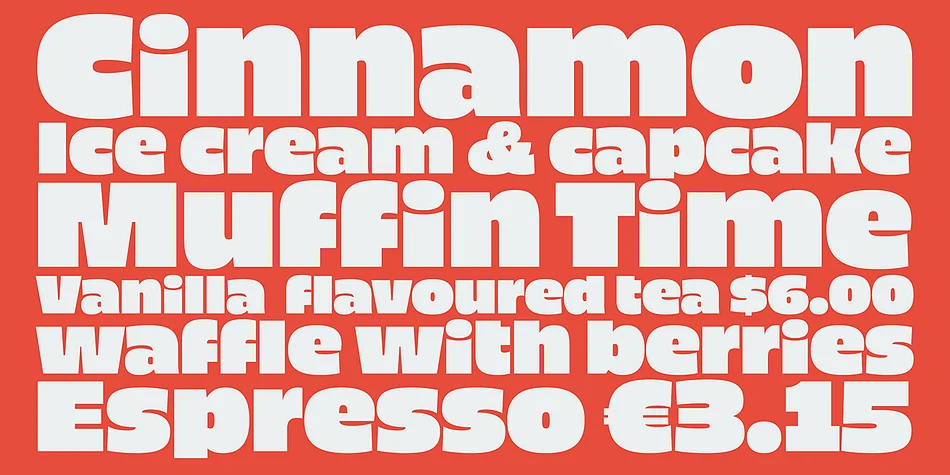
Picture yourself designing a movie title card or packaging system where bold, unapologetic typography is the whole strategy. Piepie, designed by Dharma Type, is built exactly for these moments. The typeface packs maximum visual weight while keeping ascenders and descenders compact, which lets an oversized x-height dominate the line and anchor your design with real authority.
With 461 glyphs across Mac Roman, Windows 1252, and Adobe Latin coverage (1, 2, and 3 with near-complete support), Piepie handles international projects without compromise. OpenType alternates for K, R, and Y give you flexibility when those letters need to stack or repeat in your layout. Sharp detail holds up beautifully at any display size, whether you're scaling for screen or high-res print, making it equally at home on a poster or packed into a tight headline.
Restaurant menu headers, book cover headlines, and poster work all benefit from its density and precision. Compositions stay tight thanks to the compacted ascenders and descenders, which is especially useful in constrained layouts or when you need to squeeze maximum impact into narrow horizontal space. That generous x-height means text reads with authority no matter the scale. Grab it on Creative Fabrica and put Piepie's weight and sharpness to work in your next headline or branding project.
Style & Use Cases
- Overall Style
- Eye-catching, Bold
- Use Case
- Headlines, Logos
- Ideal For
- posters, branding, and social media graphics
- Pairs With
- a readable sans or serif for body
How to Install Piepie Font
Step-by-step instructions for every platform
- 1Download the Piepie font file (.ttf or .otf).
- 2Locate the downloaded file in your Downloads folder.
- 3Right-click the font file.
- 4Select "Install" to install for the current user, or "Install for all users" to make it available system-wide.
- 5Piepie is now available in Word, Photoshop, Illustrator, and all other apps.
More by Dharma Type
View all →
Browse fonts by theme
Curated collections →Saw a font in a picture? Identify any font from an image with our free Font Finder.
More Display Fonts
Browse all →







What pairs well with Piepie Font?
Piepie Font is a display font that shines as a display or heading face. Pair it with a clean sans-serif or serif font for body text — the contrast creates a clear hierarchy while the two styles stay balanced and easy to read.




Piepie Font
by Dharma Type
Reviewed by the FontBoxDL team · Updated October 2026