 Firefox
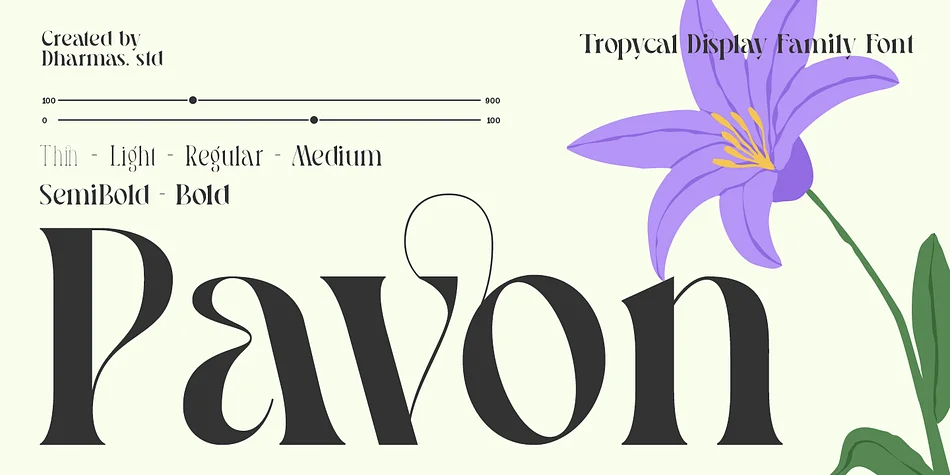 1 / 10
About Pavon Font
Picture yourself laying out an invitation suite for an upscale wedding or designing the exterior packaging for a boutique skincare line. You reach for Pavon, a display serif typeface from Dharmas Studio that channels the refinement of 1910s Italian design without feeling stuck in the past. The typeface carries that Art Nouveau sensibility, but it's built for contemporary work, blending theatrical curves with enough restraint that the type doesn't overwhelm the space around it.
Pavon works beautifully across luxury packaging, wedding stationery, gallery posters, and independent brand identities where personality matters. It ships in six weights from Thin through Bold, so you can control hierarchy and emphasis as much as you need. The real magic lives in the 21 stylistic ligatures that connect letters with a natural fluidity, plus over two dozen language variations that keep it accessible for international projects. At display sizes, the Bold weight brings impressive contrast and readability, while lighter versions feel delicate on headlines.
You'll get TTF, OTF, WOFF, and WOFF2 files, and the glyphs are PUA encoded so you can access everything without hunting through special character panels. Grab Pavon on Creative Fabrica and start bringing that refined, artistic touch to your next design.
Style & Use Cases
- Overall Style
- Eye-catching, Bold
- Use Case
- Headlines, Logos
- Ideal For
- posters, branding, and social media graphics
- Pairs With
- a readable sans or serif for body
How to Install Pavon Font
Step-by-step instructions for every platform
- 1Download the Pavon font file (.ttf or .otf).
- 2Locate the downloaded file in your Downloads folder.
- 3Right-click the font file.
- 4Select "Install" to install for the current user, or "Install for all users" to make it available system-wide.
- 5Pavon is now available in Word, Photoshop, Illustrator, and all other apps.
More by Dharmas Studio
View all →
Browse fonts by theme
Curated collections →Saw a font in a picture? Identify any font from an image with our free Font Finder.
More Display Fonts
Browse all →







What pairs well with Pavon Font?
Pavon Font is a display font that shines as a display or heading face. Pair it with a clean sans-serif or serif font for body text — the contrast creates a clear hierarchy while the two styles stay balanced and easy to read.




Pavon Font
Reviewed by the FontBoxDL team · Updated September 2026