 Firefox
 1 / 2
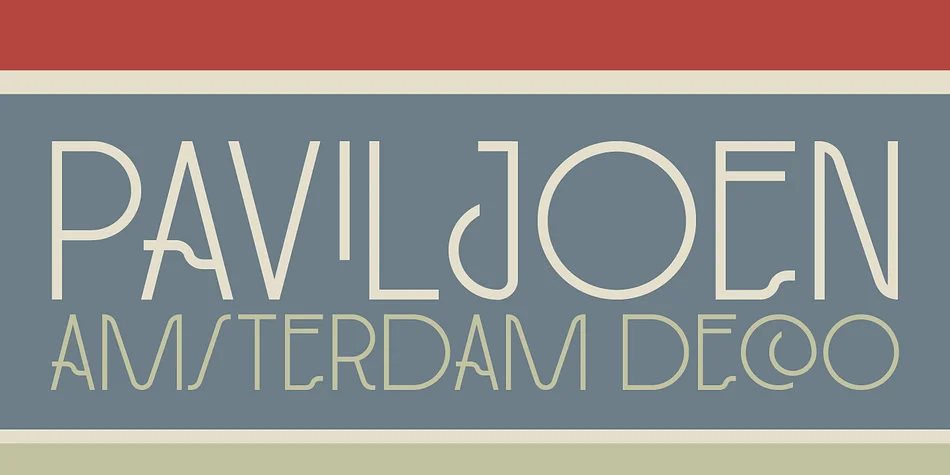
1 / 2About PAVILJOEN Font
PAVILJOEN by Hanoded is an Art Deco typeface with geometric lines inspired by cast-iron architectural lettering found on historic monumental buildings throughout Amsterdam. The designer meticulously studied original glyphs from these structures and thoughtfully completed the character set to create a cohesive, fully functional font. This approach of sourcing from real-world architecture gives Paviljoen an authenticity that sets it apart from typical retro revivals, while maintaining modern versatility and contemporary usability.
The typeface excels for projects requiring elegant vintage character with genuine substance and visual weight. Consider using it for luxury cosmetics packaging, upscale hotel menus, gallery exhibition invitations, or retro-inspired boutique branding. The geometric proportions work beautifully at large display sizes, where the ornamental quality becomes a genuine asset rather than a distraction. The font's real strength lies in its restraint: decorative enough to feel special and distinctive, clean enough to remain perfectly readable even when set prominently. With extensive language support included, you can confidently use Paviljoen across international projects without hunting for missing characters.
The authentic Art Deco lineage paired with thoughtful design execution makes this a compelling choice for designers working on heritage-focused or upscale brand identities. Grab Paviljoen on Creative Fabrica and add some geometric sophistication to your next project.
Style & Use Cases
- Overall Style
- Bold, Distinctive
- Use Case
- Headlines, Posters
- Ideal For
- logos, packaging, and standout titles
- Pairs With
- a neutral sans-serif
How to Install PAVILJOEN Font
Step-by-step instructions for every platform
- 1Download the PAVILJOEN font file (.ttf or .otf).
- 2Locate the downloaded file in your Downloads folder.
- 3Right-click the font file.
- 4Select "Install" to install for the current user, or "Install for all users" to make it available system-wide.
- 5PAVILJOEN is now available in Word, Photoshop, Illustrator, and all other apps.
More by Hanoded
View all →
Browse fonts by theme
Curated collections →Saw a font in a picture? Identify any font from an image with our free Font Finder.
More Decorative Fonts
Browse all →







What pairs well with PAVILJOEN Font?
PAVILJOEN Font is a decorative font that shines as a display or heading face. Pair it with a clean sans-serif or serif font for body text — the contrast creates a clear hierarchy while the two styles stay balanced and easy to read.




PAVILJOEN Font
by Hanoded
Reviewed by the FontBoxDL team · Updated June 2026