 Firefox
 1 / 10
About Notche Font
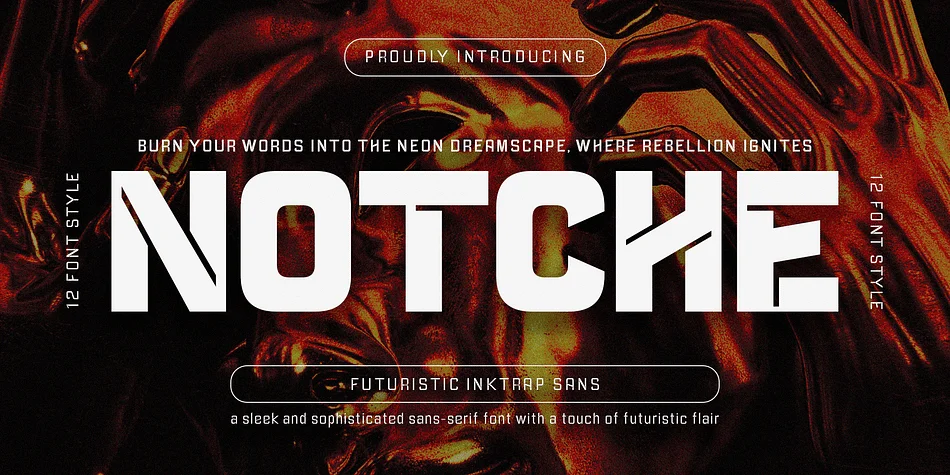
Notche by Indotype Foundry is a contemporary sans-serif that balances geometric precision with subtle inktrap details. The typeface feels distinctly modern without tipping into cold or sterile territory; its clean proportions work equally well in compact headlines or at display scales. This versatility makes it particularly effective for tech startup brand identity systems, editorial magazine spreads that demand visual impact, minimalist app interface typography, and luxury product packaging where restrained sophistication signals quality and craft.
Beyond the core character set (A-Z, a-z, numerals, and punctuation), Notche includes multiple weight variants, a full range of alternate glyphs, and carefully designed ligatures that give you precise control over how letterforms sit on the page. The font ships in three formats: OTF, TTF, and WOFF, making installation straightforward on Mac, Windows, or web projects alike. All alternates are PUA-encoded, which means you can access them directly within Adobe Suite applications and even Microsoft Word without hunting through specialty menus or additional software.
If you're building a coherent visual system or need typography that carries a complete project from start to finish, Notche belongs in your toolkit. Grab it on Creative Fabrica and start experimenting.
Style & Use Cases
- Overall Style
- Eye-catching, Bold
- Use Case
- Headlines, Logos
- Ideal For
- posters, branding, and social media graphics
- Pairs With
- a readable sans or serif for body
How to Install Notche Font
Step-by-step instructions for every platform
- 1Download the Notche font file (.ttf or .otf).
- 2Locate the downloaded file in your Downloads folder.
- 3Right-click the font file.
- 4Select "Install" to install for the current user, or "Install for all users" to make it available system-wide.
- 5Notche is now available in Word, Photoshop, Illustrator, and all other apps.
More by Indotype Foundry
View all →

Browse fonts by theme
Curated collections →Saw a font in a picture? Identify any font from an image with our free Font Finder.
More Display Fonts
Browse all →







What pairs well with Notche Font?
Notche Font is a display font that shines as a display or heading face. Pair it with a clean sans-serif or serif font for body text — the contrast creates a clear hierarchy while the two styles stay balanced and easy to read.




Notche Font
Reviewed by the FontBoxDL team · Updated September 2026