 Firefox
 1 / 3
1 / 3About NONDESCRIPT JNL Font
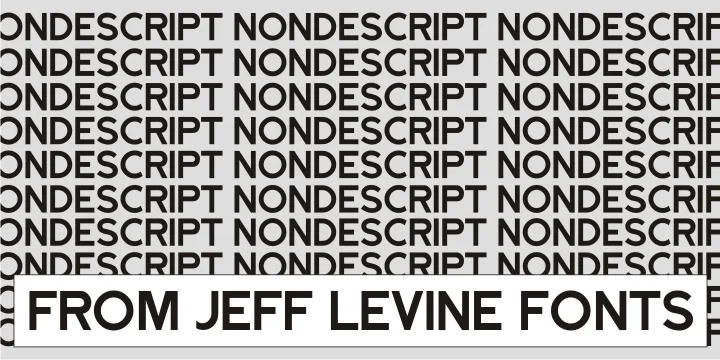
This typeface strikes an odd balance between straightforward and distinctive, making it hard to pin down at first glance. NONDESCRIPT JNL from Jeff Levine Fonts manages to feel both unassuming and full of character. There's something playful about how it resists easy categorization. The letterforms sit somewhere between casual and intentional, which makes it genuinely useful when you need a display font that feels approachable without being saccharine.
Use it for comic book word balloons and action text, vintage concert posters with attitude, children's book covers that don't talk down to kids, or indie game UI and packaging that needs personality without fussiness. It works equally well on DIY craft signs and boutique product labels where you want something a bit off-beat but still readable at a glance. The font's charm comes from refusing to fit neatly into a single aesthetic. That flexibility means it works wherever straightforward design gets dull, but it also shines when you want something that feels lived-in rather than polished.
There's an honesty to the letterforms that makes viewers trust it, even when the subject matter is tongue-in-cheek. Pair it with a clean, minimal sans-serif for body text to let this display face take center stage. Grab it on Creative Fabrica and start using it on projects that need a voice all their own.
Style & Use Cases
- Overall Style
- Eye-catching, Bold
- Use Case
- Headlines, Logos
- Ideal For
- posters, branding, and social media graphics
- Pairs With
- a readable sans or serif for body
How to Install NONDESCRIPT JNL Font
Step-by-step instructions for every platform
- 1Download the NONDESCRIPT JNL font file (.ttf or .otf).
- 2Locate the downloaded file in your Downloads folder.
- 3Right-click the font file.
- 4Select "Install" to install for the current user, or "Install for all users" to make it available system-wide.
- 5NONDESCRIPT JNL is now available in Word, Photoshop, Illustrator, and all other apps.
More by Jeff Levine Fonts
View all →



Browse fonts by theme
Curated collections →Saw a font in a picture? Identify any font from an image with our free Font Finder.
More Display Fonts
Browse all →







What pairs well with NONDESCRIPT JNL Font?
NONDESCRIPT JNL Font is a display font that shines as a display or heading face. Pair it with a clean sans-serif or serif font for body text — the contrast creates a clear hierarchy while the two styles stay balanced and easy to read.




NONDESCRIPT JNL Font
Reviewed by the FontBoxDL team · Updated September 2026