Firefox
 1 / 3
1 / 3Loading font…
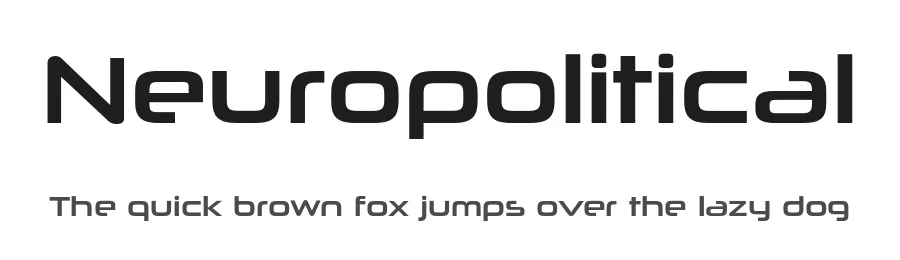
About Neuropolitical Font
Download Neuropolitical Regular free for commercial use under the Typodermic Desktop License.
Neuropolitical combines rounded-square construction with open technical details for an approachable product voice. It works for consumer devices, connected fitness, home energy, robotics, interfaces, medical technology, mobility systems, packaging, and model names that should feel advanced but not militarized.
The license lets one licensed user install the font on desktop or laptop computers and use it at no charge in commercial and non-commercial finished work. This covers logos, branding, advertising, print, packaging, merchandise, fixed website graphics, presentations, title cards, and rendered video when the delivered result contains no font software or reusable character set.
Font embedding and font-file sharing are not covered. Webfonts, apps, games, software, devices, servers, SaaS, editable templates, cloud design platforms, personalization systems, and commercial ebooks or PDFs containing embedded font software require another license or written permission. Pre-rendered static graphics inside those products are permitted when they contain no working font or reusable characters. Read the
Typodermic license guide
for details.
This free style is part of the larger Neuropolitical family. Explore the
complete Neuropolitical family
for more styles and wider licensing options.
Style & Use Cases
- Overall Style
- Eye-catching, Bold, Techno
- Use Case
- Headlines, Logos
- Ideal For
- posters, branding, and social media graphics
- Pairs With
- a readable sans or serif for body
OpenType Features
Neuropolitical ships with 4 OpenType features you can switch on in apps that support them (Illustrator, InDesign, Affinity, Figma, CSS font-feature-settings).
- Fractions
- Standard ligatures
- Scientific inferiors
- Superscripts
How to Install Neuropolitical Font
Step-by-step instructions for every platform
- 1Download the Neuropolitical font file (.ttf or .otf).
- 2Locate the downloaded file in your Downloads folder.
- 3Right-click the font file.
- 4Select "Install" to install for the current user, or "Install for all users" to make it available system-wide.
- 5Neuropolitical is now available in Word, Photoshop, Illustrator, and all other apps.
More by Typodermic Fonts
View all →
Browse fonts by theme
Curated collections →Saw a font in a picture? Identify any font from an image with our free Font Finder.
More Display Fonts
Browse all →







What pairs well with Neuropolitical Font?
Neuropolitical Font is a display font that shines as a display or heading face. Pair it with a clean sans-serif or serif font for body text — the contrast creates a clear hierarchy while the two styles stay balanced and easy to read.




Premium Display Fonts
★ PremiumWant something with more weights, glyphs, and commercial polish? These premium display fonts are worth a look.