 Firefox
About NARROW NOUVEAU JNL Font
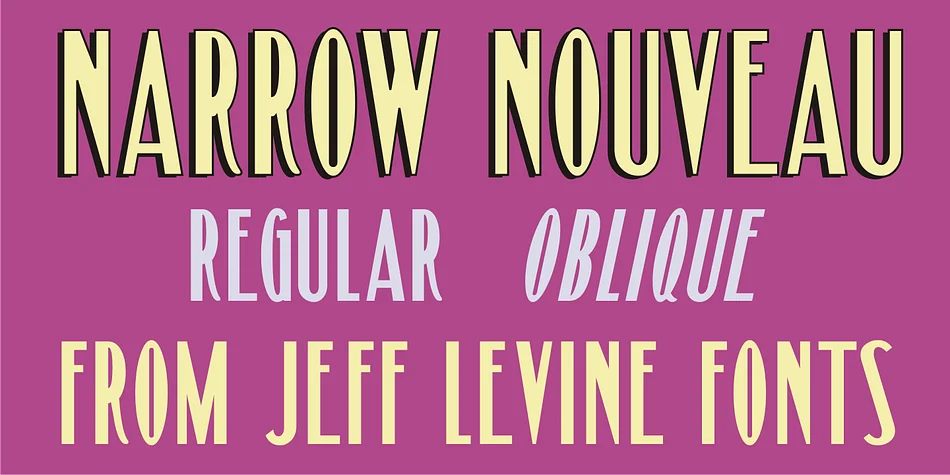
NARROW NOUVEAU JNL by Jeff Levine Fonts is a refined display typeface drawn from hand lettering on a 1907 George M. Cohan song folio titled "The Talk of New York." The design captures that distinctive turn-of-century Nouveau character with elongated letterforms and precise stroke calibration throughout. It carries genuine historical weight and nostalgia, never tipping into pastiche or camp. Available in both regular and oblique versions, you get real versatility for different typographic arrangements.
Use this one for theater lobby posters and vintage concert announcements where bold sophistication matters. It works equally well on artisanal packaging like specialty spirit labels and craft confection boxes where that refined, period-correct aesthetic sets the right tone. Wedding invitation suites and art deco stationery suit it perfectly, where the tall proportions naturally convey elegance. Book designers reach for it when designing covers and chapter titles, where historical authenticity grounds the whole visual story.
The narrow width makes it inherently efficient for compositions demanding real impact without bloat. At display sizes it remains readable and sharp, holding that crisp 1920s sensibility even when pushed large. Handling everything from standalone headlines to full editorial treatments, this typeface delivers the goods. Get NARROW NOUVEAU JNL on Creative Fabrica and bring that sophisticated vintage character to your next project.
Style & Use Cases
- Overall Style
- Eye-catching, Bold
- Use Case
- Headlines, Logos
- Ideal For
- posters, branding, and social media graphics
- Pairs With
- a readable sans or serif for body
How to Install NARROW NOUVEAU JNL Font
Step-by-step instructions for every platform
- 1Download the NARROW NOUVEAU JNL font file (.ttf or .otf).
- 2Locate the downloaded file in your Downloads folder.
- 3Right-click the font file.
- 4Select "Install" to install for the current user, or "Install for all users" to make it available system-wide.
- 5NARROW NOUVEAU JNL is now available in Word, Photoshop, Illustrator, and all other apps.
More by Jeff Levine Fonts
View all →



Browse fonts by theme
Curated collections →Saw a font in a picture? Identify any font from an image with our free Font Finder.
More Display Fonts
Browse all →







What pairs well with NARROW NOUVEAU JNL Font?
NARROW NOUVEAU JNL Font is a display font that shines as a display or heading face. Pair it with a clean sans-serif or serif font for body text — the contrast creates a clear hierarchy while the two styles stay balanced and easy to read.




NARROW NOUVEAU JNL Font
Reviewed by the FontBoxDL team · Updated September 2026