 Firefox
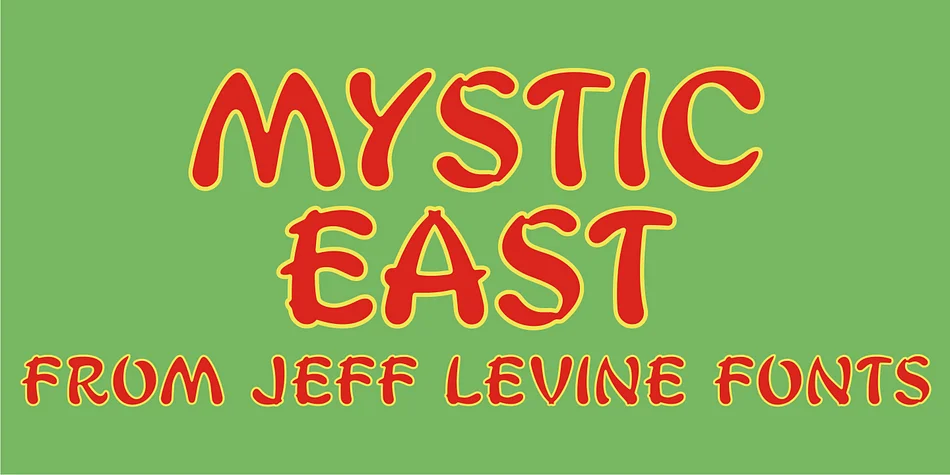
About MYSTIC EAST JNL Font
MYSTIC EAST JNL by Jeff Levine Fonts is a display typeface rooted in vintage Hollywood glamour, drawing direct inspiration from the typographic style of classic 1950s film credits. It captures that nostalgic charm while steering clear of pastiche, making it a solid choice for projects that demand authentic period character and vintage visual language. This typeface excels on movie poster designs, creating immediate impact with that retro cinema aesthetic. Vintage concert and band promotional materials benefit from its inherent energy and period authenticity.
Retro postcard layouts, classic film festival signage, and vintage-inspired business cards all gain character when paired with this font. It carries enough personality to serve as a standalone heading while remaining legible across different sizes, a balance many period-specific faces struggle to achieve. These letterforms work equally well for vintage-inspired branding projects, album cover artwork, and any design calling for mid-century visual language. Its roots in actual film typography give it credibility that hand-crafted recreations often lack.
Retrospective publications, throwback event announcements, and themed brand identities all benefit from this typeface's specific 1950s sensibility without veering into novelty territory. Get MYSTIC EAST JNL on Creative Fabrica and bring that authentic vintage Hollywood spirit to your next project.
Style & Use Cases
- Overall Style
- Eye-catching, Bold
- Use Case
- Headlines, Logos
- Ideal For
- posters, branding, and social media graphics
- Pairs With
- a readable sans or serif for body
How to Install MYSTIC EAST JNL Font
Step-by-step instructions for every platform
- 1Download the MYSTIC EAST JNL font file (.ttf or .otf).
- 2Locate the downloaded file in your Downloads folder.
- 3Right-click the font file.
- 4Select "Install" to install for the current user, or "Install for all users" to make it available system-wide.
- 5MYSTIC EAST JNL is now available in Word, Photoshop, Illustrator, and all other apps.
More by Jeff Levine Fonts
View all →



Browse fonts by theme
Curated collections →Saw a font in a picture? Identify any font from an image with our free Font Finder.
More Display Fonts
Browse all →







What pairs well with MYSTIC EAST JNL Font?
MYSTIC EAST JNL Font is a display font that shines as a display or heading face. Pair it with a clean sans-serif or serif font for body text — the contrast creates a clear hierarchy while the two styles stay balanced and easy to read.




MYSTIC EAST JNL Font
Reviewed by the FontBoxDL team · Updated June 2026