 Firefox
 1 / 10
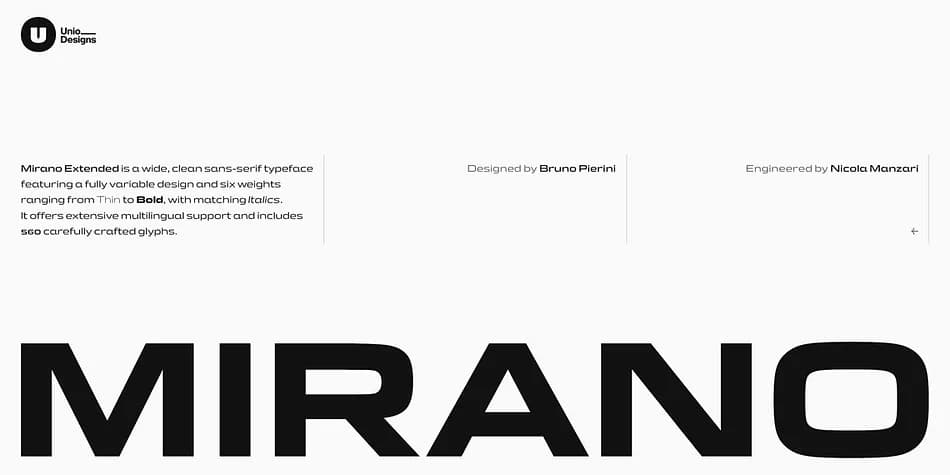
About Mirano Extended Variable Font
This typeface captures the clean precision of mechanical design with a distinctly contemporary voice. Mirano Extended Variable, created by Unio Creative Solutions, channels the geometric confidence of automotive lettering and Eurostile, reimagining those foundational principles for today's branding systems and interface design.
The design extends classic engineered proportions into a wider, more emphatic stance with sharper letterforms and refined details. Letterforms strike that balance between precision and polish, making them strong choices for automotive showroom identity systems, luxury goods packaging, tech product launch campaigns, and minimal geometric interface design. The typeface ships as a variable font spanning Thin through Bold, backed by six static weights for maximum tool compatibility, plus italics that keep the same forward momentum and compact efficiency as their roman counterparts.
Fully loaded with professional OpenType features like ligatures, stylistic sets, case-sensitive glyphs, and positional numerals, Mirano hands you control to fine-tune visual rhythm and impact in any design context you're working in. Combine it with a clean, neutral sans-serif for body text to maintain breathing room and hierarchical clarity across larger systems. Get Mirano Extended Variable on Creative Fabrica and add that engineered precision to your design toolkit.
Style & Use Cases
- Overall Style
- Eye-catching, Bold
- Use Case
- Headlines, Logos
- Ideal For
- posters, branding, and social media graphics
- Pairs With
- a readable sans or serif for body
How to Install Mirano Extended Variable Font
Step-by-step instructions for every platform
- 1Download the Mirano Extended Variable font file (.ttf or .otf).
- 2Locate the downloaded file in your Downloads folder.
- 3Right-click the font file.
- 4Select "Install" to install for the current user, or "Install for all users" to make it available system-wide.
- 5Mirano Extended Variable is now available in Word, Photoshop, Illustrator, and all other apps.
More by Unio Creative Solutions
View all →
Browse fonts by theme
Curated collections →Saw a font in a picture? Identify any font from an image with our free Font Finder.
More Display Fonts
Browse all →







What pairs well with Mirano Extended Variable Font?
Mirano Extended Variable Font is a display font that shines as a display or heading face. Pair it with a clean sans-serif or serif font for body text — the contrast creates a clear hierarchy while the two styles stay balanced and easy to read.



Mirano Extended Variable Font
Reviewed by the FontBoxDL team · Updated September 2026