 Firefox
 1 / 6
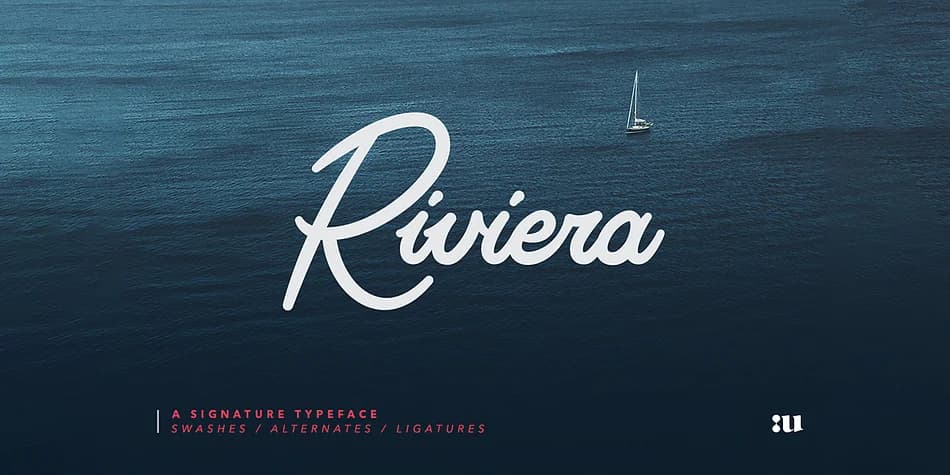
1 / 6About Riviera Signature Font
Riviera Signature has the kind of flowing letterforms that make you stop and look twice. Designed by Unio Creative Solutions, this modern script captures genuine handwritten warmth while staying polished enough for luxury brands and upscale commercial work. The curves feel confident rather than delicate, giving the entire typeface a grounded quality that most lighter script fonts simply cannot achieve. It reads as sophisticated, not sketchy.
Designers reach for this font when building custom product packaging, developing personalized stationery lines, creating wedding invitation suites, designing social media graphics where the hand-drawn aesthetic resonates, or lettering special event materials and signage. The character set spans over 400 glyphs with solid Latin language support, 57 carefully crafted ligatures that feel natural within words, and a generous collection of swashes and alternate letterforms to work with. Because you get multiple versions of each letter, you can shift the mood and personality of a single word without switching fonts, letting your design adapt as the concept evolves. This is the typeface for makers, boutique brands, and independent designers who want their visual identity to feel genuinely crafted rather than templated. Find Riviera on Creative Fabrica in both the standard version and the swash-expanded variant.
Style & Use Cases
- Overall Style
- Elegant, Flowing
- Use Case
- Invitations, Branding
- Ideal For
- wedding stationery, greeting cards, and signatures
- Pairs With
- a simple uppercase sans
How to Install Riviera Signature Font Font
Step-by-step instructions for every platform
- 1Download the Riviera Signature Font font file (.ttf or .otf).
- 2Locate the downloaded file in your Downloads folder.
- 3Right-click the font file.
- 4Select "Install" to install for the current user, or "Install for all users" to make it available system-wide.
- 5Riviera Signature Font is now available in Word, Photoshop, Illustrator, and all other apps.
More by Unio Creative Solutions
View all →
Browse fonts by theme
Curated collections →Saw a font in a picture? Identify any font from an image with our free Font Finder.
More Script Handwritten Fonts
Browse all →







What pairs well with Riviera Signature Font?
Riviera Signature Font is a script font that shines as a display or heading face. Pair it with a clean sans-serif or serif font for body text — the contrast creates a clear hierarchy while the two styles stay balanced and easy to read.



Riviera Signature Font
Reviewed by the FontBoxDL team · Updated July 2026